Notes
HubSpot to Google Ads: Sending Verified Stages Back as Offline Conversions
To connect HubSpot to Google Ads properly you need four things: the click identifier captured on every form as a contact property, one deal or lifecycle stage that a human confirms, a decision about whether HubSpot's own ads integration or an offline import is your primary signal, and an upload that carries the identifier, the stage and the time. Running both as primary is the most common mistake.
Key takeaways
- Create the properties before the first form fill. Retrofitting an identifier that was never captured is impossible.
- Store the identifier as single-line text and never let a workflow lowercase it.
- HubSpot's native ads integration and a manual offline import report differently. Pick one as primary.
- Upload a stage a person confirms, not a form submission.
- For clinics, check which HubSpot features sit inside the sensitive-data scope before any patient data goes in.
Contents
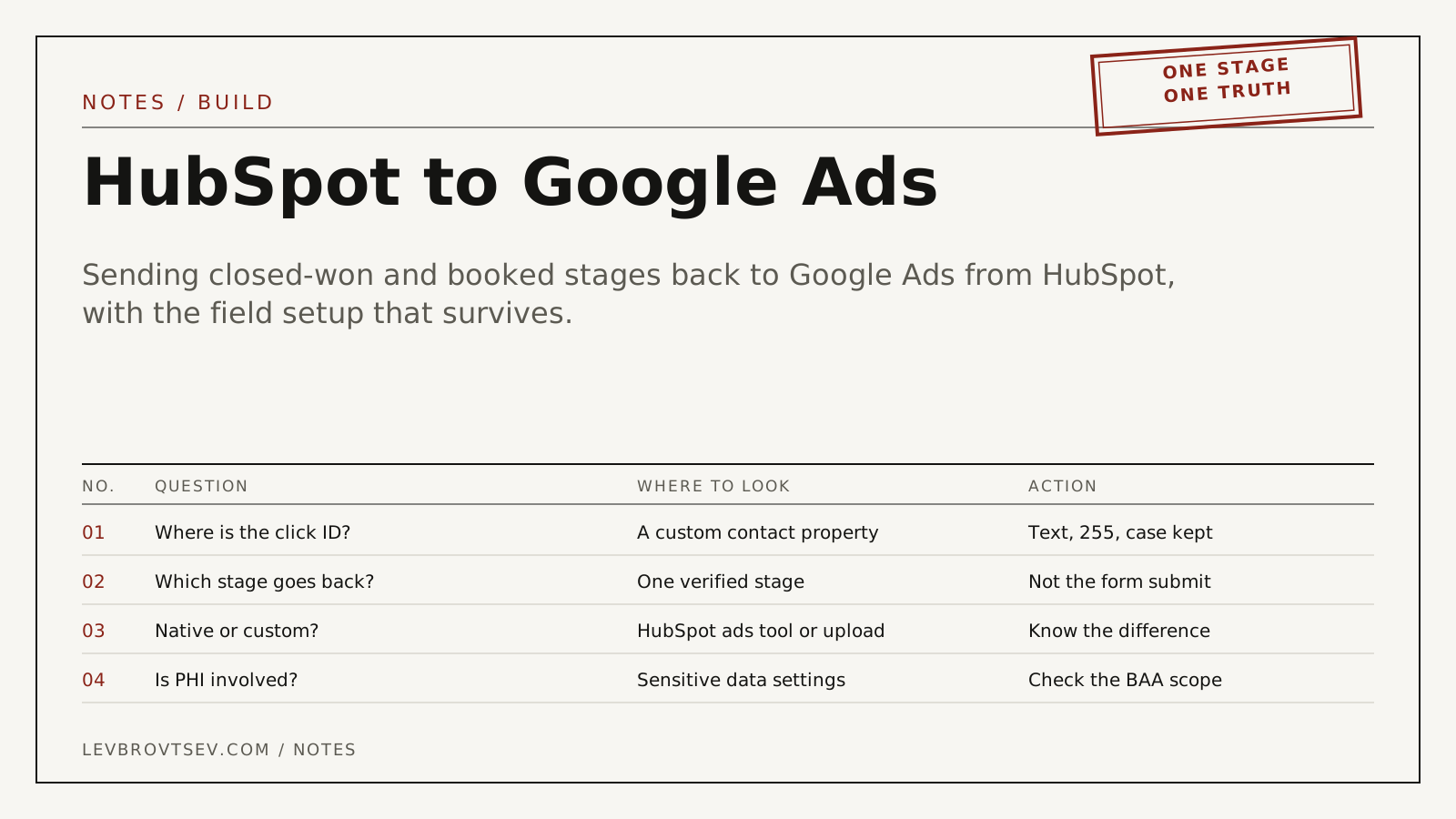
HubSpot knows which deals closed. Google Ads knows which clicks it sold you. Neither knows about the other until you join them, and the join key is a string that has to be captured at the very first form fill.
What the connection actually does
It tells Google Ads which of its clicks produced a real outcome in your pipeline, so bidding optimises toward those rather than toward form submissions. The mechanism is the same as any offline conversion import, described in the offline conversion tracking guide; only the source system differs.
The properties to create first
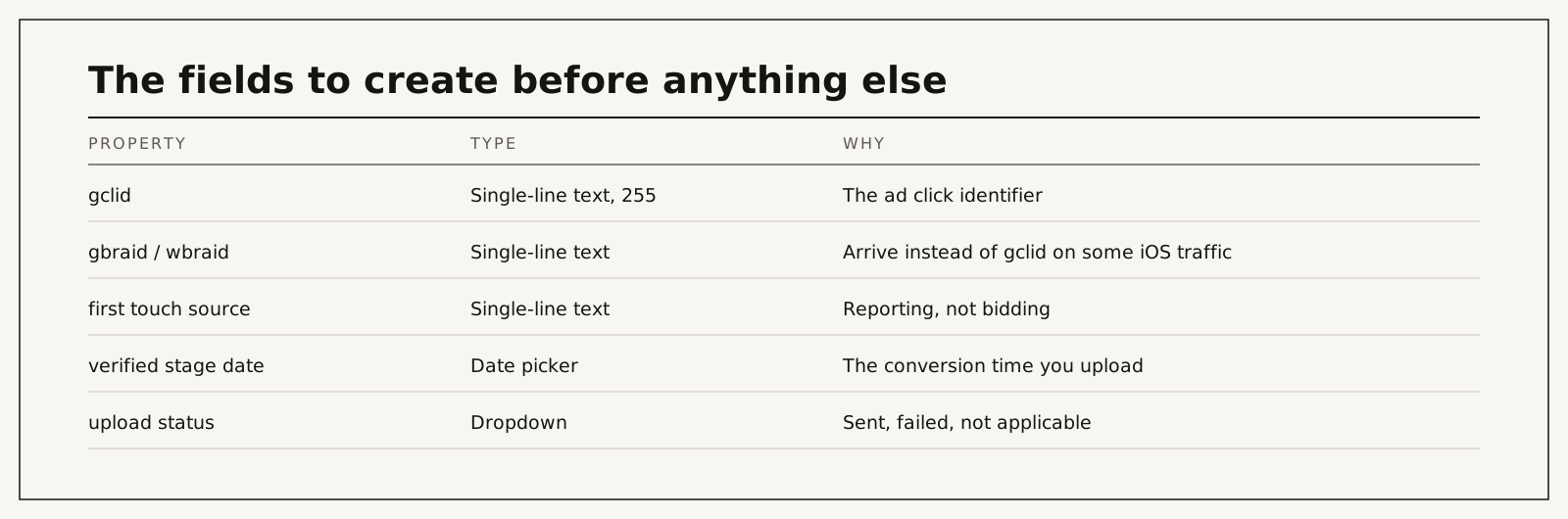
| Property | Type | Why |
|---|---|---|
| gclid | Single-line text, 255 characters | The ad click identifier |
| gbraid and wbraid | Single-line text | Arrive instead of gclid on some iOS traffic |
| first touch source | Single-line text | Reporting, not bidding |
| verified stage date | Date picker | The conversion time you upload |
| upload status | Dropdown | Sent, failed, not applicable |
Two rules that save weeks later. Set the identifier once and never overwrite it, so a returning visitor does not rewrite their original attribution. And check that no workflow, import or deduplication rule changes its case, because the value is case-sensitive and a lowercased identifier will never match.
From form to Google Ads
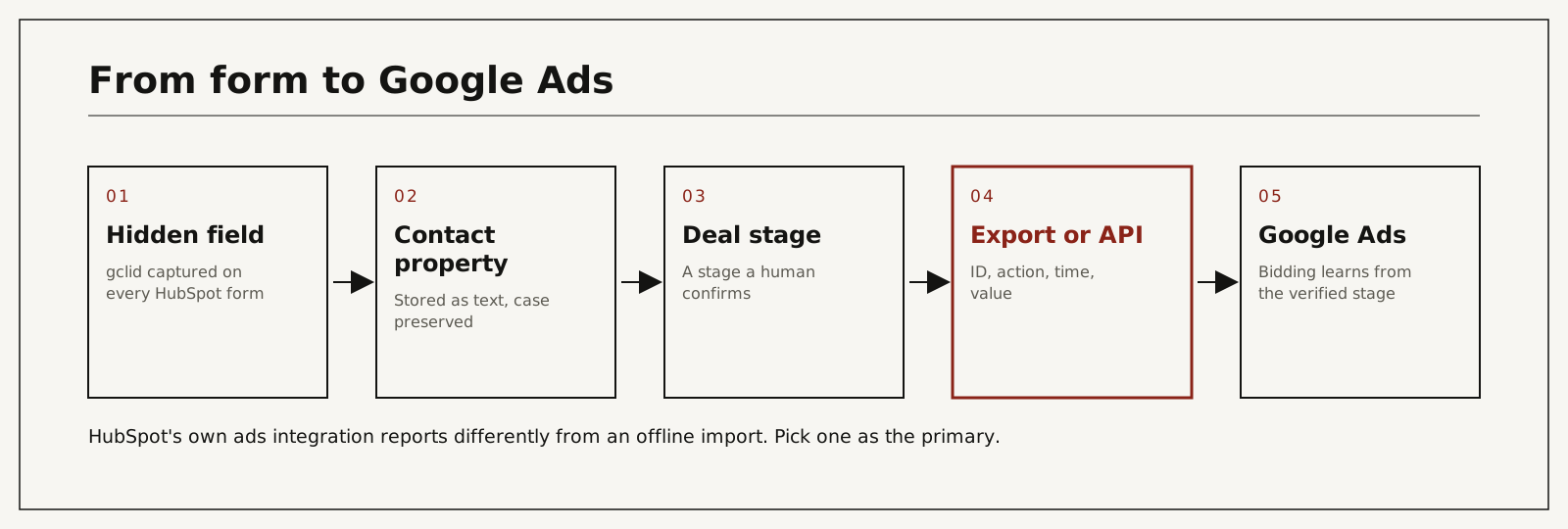
- Add a hidden field for the identifier to every HubSpot form, populated from a first-party cookie by a small script on the page.
- Confirm it lands on the contact record with capitals intact. Test with a hand-typed value.
- Choose one stage that a person confirms: consultation attended, qualified, closed won. Not "form submitted".
- When a record reaches that stage, export or send the identifier, the conversion action, the time and any value.
- Upload to Google Ads, then reconcile monthly: uploaded count against HubSpot stage count.
If the identifier is missing from the record, the fault is upstream in capture, not in HubSpot. The six usual causes are in what a GCLID is, and the form side in HIPAA-compliant forms.
Native integration or offline import
HubSpot offers its own Google Ads integration that can report on ad-sourced contacts and, depending on setup, send events back. A manual or scripted offline import gives you exact control over which stage is sent, when, and with what name.
Either is defensible. Both as primary is not: the same outcome gets counted twice, cost per conversion halves, and bidding optimises against inflated data. Decide which one is primary, mark the other's actions as secondary, and write the decision down where the next person will find it.
What goes wrong
| Cause | What actually happens | Hidden cost | What you see | Risk level |
|---|---|---|---|---|
| Identifier never captured | Nothing can be matched | All ad spend unattributable | Empty gclid property on new contacts | High |
| A workflow lowercases the value | Uploads fail silently | Weeks of missing data | "Click not found" in the import log | Medium |
| Native integration and import both primary | The outcome counted twice | Cost per conversion halves | Conversions roughly double overnight | High |
| Form submission used as the stage | Bidding learns from forms again | The whole exercise achieves nothing | Stage 1 volume high, later stages flat | High |
| Meeting-booking tool in an iframe | The identifier never reaches the form | Your best leads train nothing | Bookings with no identifier | High |
| Contacts merged | The surviving record loses the value | Returning enquirers disappear | Match rate falling over time | Medium |
The healthcare caveat
If patient data will live in HubSpot, the sensitive-data configuration and the covered-services list decide what you may store where, and that is a separate conversation from this one. The scope questions are in HIPAA-compliant CRM. For the upload itself, keep the payload to the identifier, a neutral stage name and the time, which is the design in click-ID-only conversion feeds.
What it costs
| Route | Typical cost | Time to the first verified upload | What it depends on |
|---|---|---|---|
| In-house with HubSpot workflows and a manual export | Staff time | Days | Whether forms already carry the identifier |
| Developer builds the export and upload | Upwork lists tag manager specialists at $20 to $49 an hour, median $30; senior US consultants at $85 to $175 | Days to weeks | Number of entry points, meeting tools |
| I build it | Paid audit $500 per channel, credited toward setup; setup from $1,500 | Scoped in the audit, then about 30 clean days before bidding relies on it | Forms, meeting links, call tracking |
The paid audit covers one ad channel for one location: the account, the tracking and the path from enquiry to booked patient, ending with a prioritized fix list. It is $500, paid upfront, and credited toward setup if we work together.
You work with me directly. There are no account managers and no juniors.
15 minutes. With me, not a sales rep.
Create the property today
Even if the upload is months away, add the identifier property and the hidden fields now. Every day without them is a day of enquiries that can never be connected to the clicks you paid for. If you want the whole loop built and reconciled, start with the audit, or see CRM-verified attribution.
Frequently asked questions
Does HubSpot capture the Google click identifier automatically?
Not reliably. Add a hidden field to every form and populate it from a first-party cookie, then verify on a real submission.
Should I use HubSpot's Google Ads integration or an offline import?
Either, not both as primary. The native integration is easier; an offline import gives exact control over which stage counts.
Which stage should I send?
The first one a human confirms and that happens often enough for bidding to learn from. For clinics that is usually consultation attended rather than booked.
What about meetings booked through HubSpot links?
Test whether the identifier survives the meeting flow. Embedded scheduling tools are a common place for it to disappear.
Can I send deal value?
Yes, and it improves bidding when values differ meaningfully. In healthcare, use weights rather than real prices if the amount would reveal the procedure.
How far back can I upload?
Google accepts a click for up to 90 days. For longer cycles, send an earlier verified stage inside that window.
Who does the work if I hire you?
I do: the properties, the capture, the export and the reconciliation. Nothing is subcontracted or delegated.
How do I verify it is working?
Open ten recent contacts from paid traffic: eight or more should carry the identifier with capitals intact. Then compare uploaded counts against HubSpot stage counts for the month.