Notes
HIPAA-Compliant CRM: What a Clinic's Marketing Team Can Actually Use
No CRM is HIPAA compliant on its own. A CRM can be used in a HIPAA-compliant way when the vendor signs a business associate agreement, you keep protected health information inside the features that agreement covers, and you control who can see it. The logo on the pricing page tells you none of that.
Key takeaways
- "HIPAA compliant" describes how you use a product under a signed BAA. It is never a property of the software.
- A BAA covers named features, often on the top plan only. PHI placed anywhere else in the same product is outside it.
- Every connected app is a separate vendor. An automation tool that reads your CRM needs its own BAA.
- Marketing needs very little health data: contact details, the enquiry, the pipeline stage and the ad click ID. Diagnoses and notes belong in the clinical system.
- HubSpot and Salesforce both offer a BAA, with conditions. Details and sources are below.
Contents
- What makes a CRM HIPAA compliant?
- A BAA covers features, not the whole product
- HubSpot and Salesforce, from their own legal pages
- Nine questions for any CRM vendor
- What belongs in a marketing CRM and what does not
- Where CRM setups go wrong
- What it costs, by route
- Configure what you have, switch, or keep marketing data out
- How I set it up
- Read the covered services list before the demo
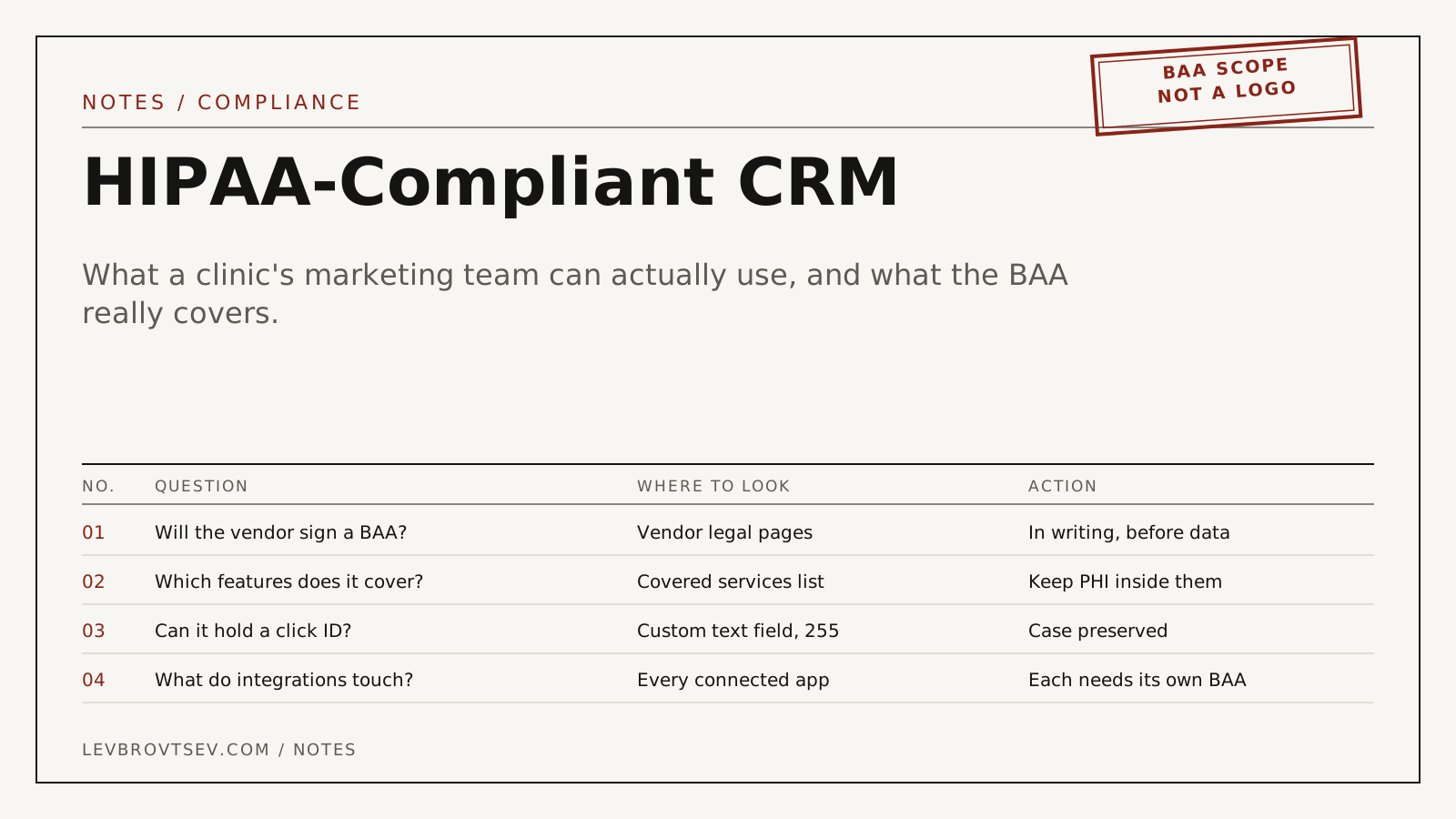
You are choosing a CRM for the front desk and the marketing team, or you already have one and somebody has asked whether it is allowed. The sales page says "HIPAA compliant" next to a padlock. That phrase is doing a lot of work.
I am a marketing consultant and not a lawyer. What follows is a sourced map for the conversation with your privacy officer, written from the side of the person who has to make the ad account and the CRM talk to each other without sending anything they should not.
What makes a CRM HIPAA compliant?
A CRM is used in a HIPAA-compliant way when three things are true: the vendor has signed a business associate agreement with you, protected health information is stored only in the features that agreement covers, and your own access controls, logging and staff practices meet the Security Rule. Remove any one of the three and the label means nothing.
HHS explains the contract requirement under business associates. Whether you are a covered entity at all is a separate question. A cash-pay practice that never bills insurance electronically may not be, as HHS sets out under covered entities. The FTC and state health-privacy laws can still apply.
A BAA covers features, not the whole product
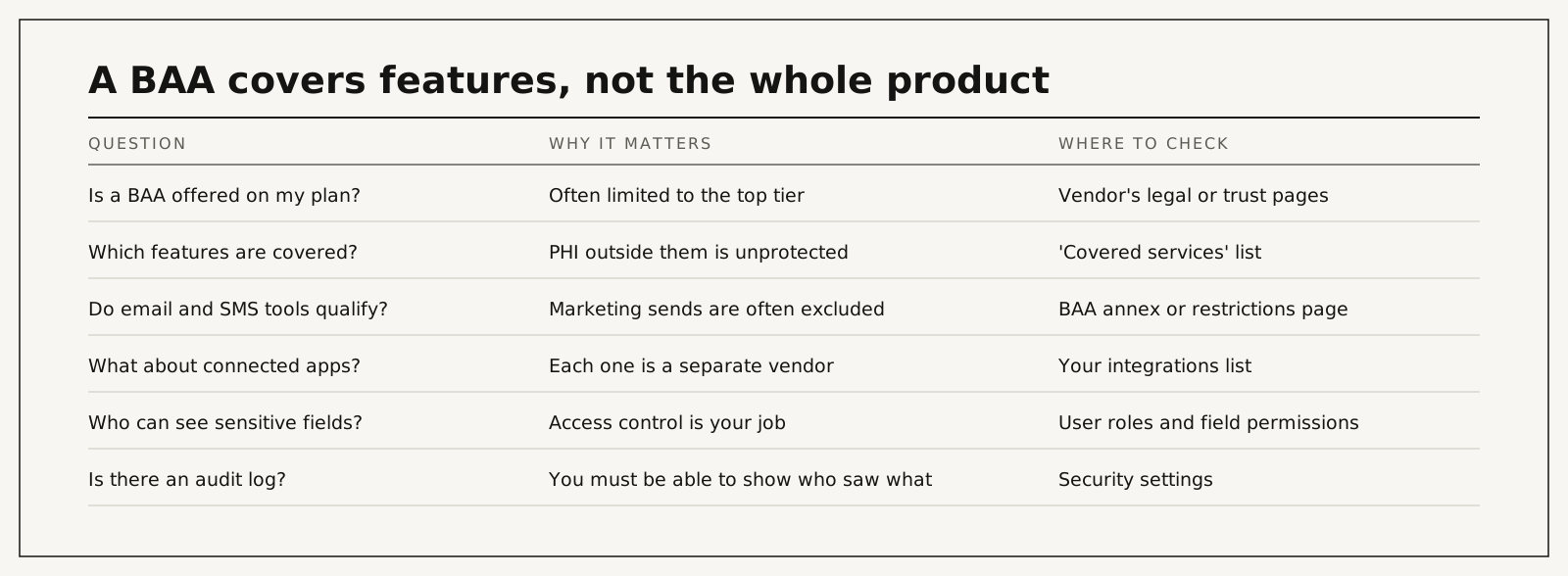
This is the part that catches careful people. A vendor can truthfully say it signs a BAA while most of what your marketing team wants to do sits outside it. Typical limits:
- The BAA is available only on the highest plan.
- It lists "covered services". Email sends, SMS, chat, AI features or reporting add-ons may be excluded.
- It expects you to switch on specific settings, mark sensitive fields and restrict access. Until you do, you are outside its terms.
- It says nothing about the apps you connect. Each of those is your responsibility.
HubSpot and Salesforce, from their own legal pages
Salesforce is the CRM I have built attribution in hands-on. HubSpot I describe from its own documentation. Both publish their terms. Checked on 18 September 2026. Read the current versions before you decide.
| CRM | BAA offered? | Conditions the vendor states | Source |
|---|---|---|---|
| HubSpot | Yes, by accepting it inside the product | Enterprise editions only. A super admin turns on Sensitive Data settings, identifies the account as a HIPAA covered entity or business associate, and accepts the Sensitive Data Terms and the BAA. PHI is permitted only in the features HubSpot lists as covered | HubSpot: store sensitive data |
| Salesforce | Yes, as a signed Business Associate Addendum arranged through your account representative | Applies only to the HIPAA covered services named in the BAA. The customer must follow Salesforce's BAA restrictions, including encrypting PHI in transit and, where within its control, at rest | Salesforce: Business Associate Addendum restrictions |
My practical read. HubSpot's documentation describes a quicker path for a small marketing team, and the limit to watch is which tools are covered once Sensitive Data is on. Salesforce, which I know from the inside, is heavier to set up and far more configurable, which matters when you need field-level control and an audit trail across intake, front desk and marketing. In both, the click ID field and the stage history that marketing needs are ordinary data and cause no difficulty.
I am not listing other CRMs. Several advertise HIPAA support. I have not verified their terms, and a table of logos copied from other blogs is how bad decisions get made. Use the nine questions below on any of them.
Nine questions for any CRM vendor
| # | Question | A good answer sounds like |
|---|---|---|
| 1 | Will you sign a BAA on the plan I am buying? | Yes, and here is the document |
| 2 | Which features are covered services? | A written list you can read before paying |
| 3 | Are marketing email and SMS covered? | A clear yes or no, per tool |
| 4 | Are AI features covered? | Named individually, with data handling explained |
| 5 | Can I restrict sensitive fields by role? | Field-level permissions, not only record-level |
| 6 | Is there an audit log of who viewed and exported what? | Yes, retained for a stated period |
| 7 | What happens to PHI in support tickets and sandboxes? | Covered, or explicitly kept out |
| 8 | Can I add a custom text field of 255 characters that keeps upper and lower case? | Yes. This is the ad click ID |
| 9 | How do integrations authenticate, and can I limit what they read? | Scoped access per integration |
Question eight looks out of place. It is the one that decides whether your advertising can ever be judged on patients. I explain why in what a GCLID is.
What belongs in a marketing CRM and what does not
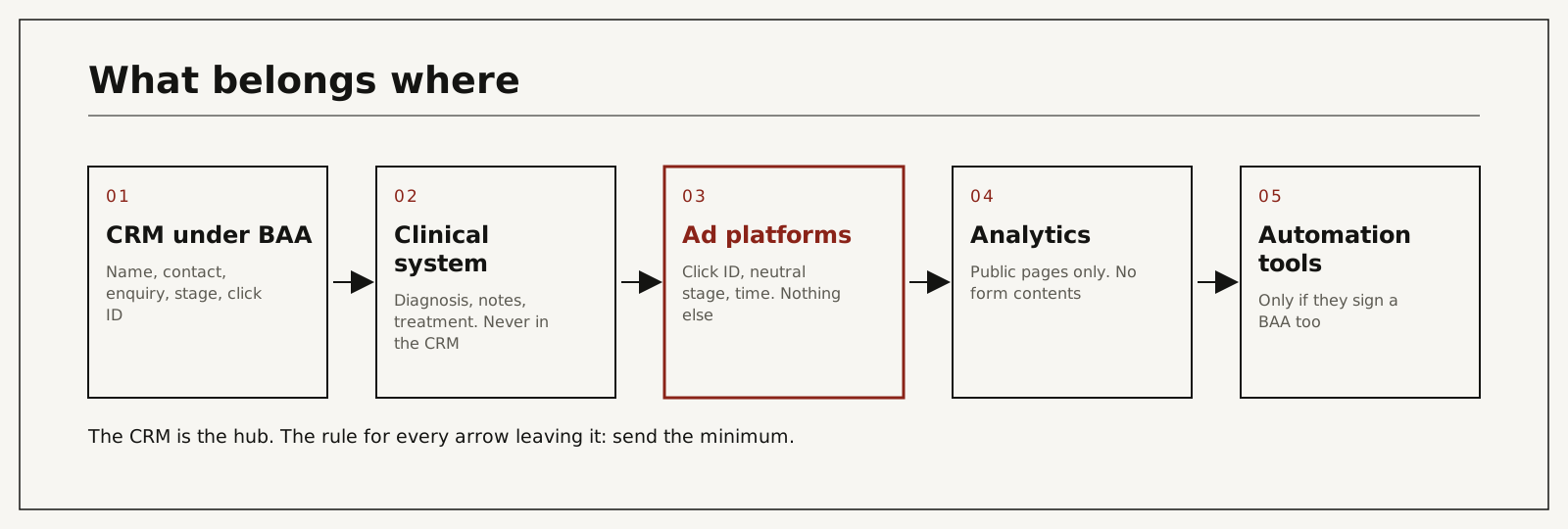
Marketing and front-desk work need surprisingly little: name and contact details, how the person enquired, which service line they asked about in general terms, the pipeline stage, dates, the source and the ad click ID. That is enough to follow up, to report honestly and to tell Google which clicks became patients.
Diagnoses, clinical notes, photos, test results and treatment plans belong in your clinical system. The most reliable way to keep PHI out of places it should not be is to never put it in the CRM in the first place. The free-text notes field is where this rule usually breaks. The same applies one step earlier, on the website, which is why the enquiry form needs its own checks.
What leaves the CRM toward advertising platforms should be smaller still: a click ID, a neutral stage name and a time. I describe that design in click-ID-only conversion feeds, and the wider method in the offline conversion tracking guide. HHS sets out the reasoning in its guidance on online tracking technologies.
Where CRM setups go wrong
| Cause | What actually happens | Hidden cost | What you see | Risk level |
|---|---|---|---|---|
| BAA signed, sensitive settings never switched on | You are outside the terms you signed | The BAA protects nothing you do | Default configuration, no restricted fields | High |
| Wrong plan | BAA not available on your tier | Forced upgrade, or uncovered PHI | Vendor says "Enterprise only" after purchase | High |
| Automation tool connected without its own BAA | PHI passes through an uncovered vendor | The cleanest CRM setup undone by a connector | A long list of connected apps nobody owns | High |
| Clinical detail typed into notes | PHI spreads to every user and export | Exposure grows with every record | Free-text fields full of health information | High |
| Everyone is an admin | No access control in practice | Audit log is meaningless | Dozens of full-access users | Medium |
| Marketing email sent from an uncovered tool | Health-related messages outside the BAA | A breach by newsletter | Campaign lists built from treatment fields | High |
| No click ID field | Advertising can never be tied to patients | Years of bidding on form fills | Source field says "website" and nothing more | Medium |
The marketing email row has its own article: HIPAA-compliant marketing automation.
What it costs, by route
I do not quote vendor prices here because they change and depend on seats and editions. Ask for the price of the plan that includes the BAA, not the entry plan.
| Route | Typical cost | Time to a defensible setup | What it depends on |
|---|---|---|---|
| Configure the CRM you already have | Staff and admin time, possibly a plan upgrade | Days for the settings, weeks for staff habits to change | Whether your plan offers a BAA at all |
| Move to a CRM that offers one | Licences plus migration | Months | Data volume, integrations, training |
| Keep the CRM PHI-free by design | Process and discipline | Weeks | A clinical system that holds everything sensitive |
| I set up the marketing side: fields, stages, click ID, feed | Paid audit $500 per channel, credited toward setup. The build is part of setup from $1,500 | Scoped in the audit | Entry points, call tracking, sign-off |
| Leave it | Nothing today | Never | Exposure grows with every record added |
Configure what you have, switch, or keep marketing data out
| Option | Cost | Time to result | Risk | When it makes sense |
|---|---|---|---|---|
| Configure your current CRM under its BAA | Low to medium | Fast | Staff drift back to old habits | Your vendor offers a BAA on your plan |
| Switch CRM | High | Slow | Migration errors, lost history | Your vendor will not sign one |
| Keep PHI out of the CRM entirely | Low | Fast | Depends on discipline with free text | Small practices with a good clinical system |
| Do nothing | None | None | Compounding exposure | Never |
A healthcare IT firm or your CRM's implementation partner is the right choice for the security configuration itself. My part is narrower: making sure the marketing data model is minimal, the click ID survives, and what leaves toward ad platforms is the smallest payload that still teaches bidding.
How I set it up
- I list what marketing needs from the CRM, field by field, and strike everything clinical.
- I add the click ID fields, text, 255 characters, case preserved, set once and never overwritten.
- I define three neutral pipeline stages with you that can be shared with ad platforms.
- I check every form, booking tool and call tracking number writes to those fields.
- I review connected apps with you and flag any that touch the CRM without a BAA.
- I build the feed to Google Ads and Microsoft Ads with a written log, and your privacy officer approves the payload.
After 30 days you can see which campaigns produce which stages. After 90 you are judging advertising on patients. It is the method behind the one result I quote: I inherited an underperforming account and rebuilt it; cost per acquisition came down by about 78% while spend grew.
The paid audit covers one ad channel for one location: the account, the tracking and the path from enquiry to booked patient, ending with a prioritized fix list. It is $500, paid upfront, and credited toward setup if we work together.
You work with me directly. There are no account managers and no juniors.
15 minutes. With me, not a sales rep.
If you want the marketing side of your CRM checked by someone who also runs the ad accounts, that sits inside my HIPAA-compliant conversion tracking work. The paid audit is $500 per channel, per location, paid upfront, and credited toward setup if we work together. You work with me directly. Book a call or write first.
Read the covered services list before the demo
The demo will show you pipelines and dashboards. The decision is in a legal annex most buyers never open. Ask for the BAA and the list of covered services first, then the price of the plan that includes them. Keep clinical detail out of the CRM, add the click ID field on day one, and send ad platforms the minimum. If you want the marketing half of that checked, start with the audit.
Frequently asked questions
Is HubSpot HIPAA compliant?
HubSpot offers a BAA on Enterprise editions once Sensitive Data settings are turned on and the terms are accepted, and only for the features it lists as covered. Out of the box, on lower plans, or outside those features, it is not suitable for PHI.
Is Salesforce HIPAA compliant?
Salesforce offers a Business Associate Addendum for named covered services, arranged through your account representative, with restrictions the customer must follow, including encryption. The platform can be used compliantly. It is not compliant by default.
Do I need a BAA if I only store names and phone numbers?
If you are a covered entity and the record shows the person enquired about care, that combination can be PHI. Ask your counsel. Most clinics should assume they need one.
What does a compliant setup cost?
The main costs are the plan that includes the BAA and the time to configure it properly. On the marketing side my paid audit is $500 per channel, and setup starts from $1,500. The expensive route is migration, which is only needed when your vendor will not sign.
Can my team set this up without help?
The BAA acceptance and basic settings, usually yes. Field-level permissions, integration review and the advertising feed benefit from someone who has done them before.
Does connecting an automation tool break compliance?
It can. Any tool that reads PHI from the CRM is a business associate and needs its own agreement. Limit what each integration can read and keep a list of who owns it.
Who does the work?
On the marketing side, I do: the data model, the click ID, the stages and the feed. Security configuration belongs to your IT or implementation partner. Nothing I do is handed to a junior or subcontracted.
How do I verify it myself?
Find the signed BAA. Open the covered services list and check it against the features you use. Open ten records and read the notes field. Open the connected apps list and ask who owns each one.
Sources and official documentation
Every technical claim above can be checked against the platform's own documentation.
- Use of Online Tracking Technologies by HIPAA Covered Entities and Business Associates (HHS)HHS guidance on when tracking tools on a healthcare website may not send protected health information to vendors. A federal court vacated one part of it in June 2024 (AHA v. Becerra); HHS notes this on the page.
- Business Associates (HHS)Who counts as a business associate and what a business associate agreement must cover.