Notes
What Is GCLID? The Google Click ID, Explained for People Who Pay for the Clicks
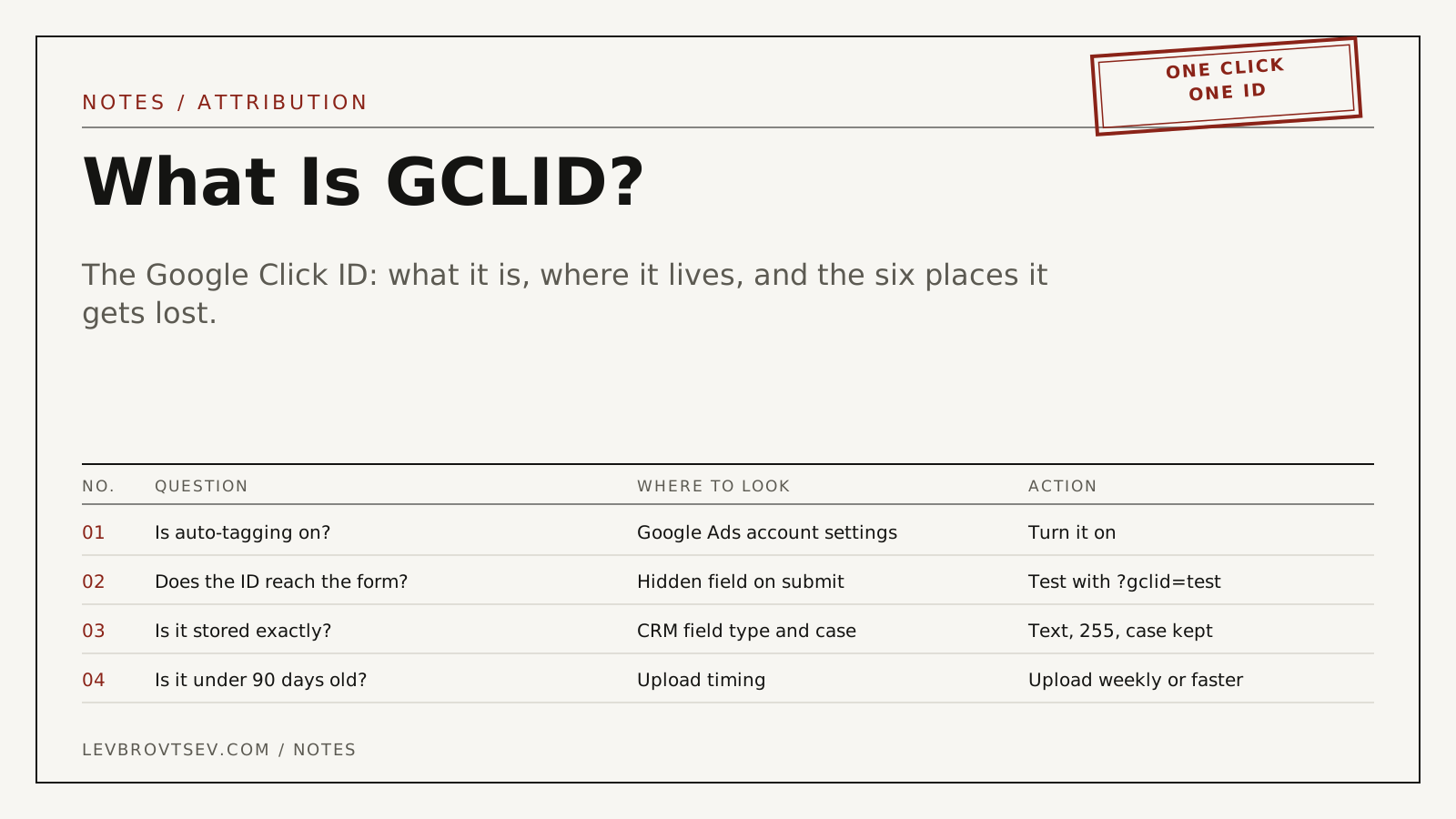
GCLID stands for Google Click Identifier. It is a unique, case-sensitive string that Google Ads adds to your landing page URL when someone clicks an ad. It lets Google, and you, connect one specific click to whatever that person did next: a form, a call, a booking, a payment.
Key takeaways
- A GCLID is created per click, not per person. One visitor who clicks three ads has three GCLIDs.
- It appears in the URL as ?gclid= followed by a long string, and the Google tag copies it into a first-party cookie.
- It is case-sensitive. A CRM that lowercases it has destroyed it.
- Google accepts it for offline conversion uploads for up to 90 days after the click.
- The ID is the only thing that lets you tell Google which clicks became patients without sending patient details.
Contents
You open a lead in your CRM and see a field full of letters and numbers labelled gclid. Or, more often, you see an empty field. Either way somebody has told you it matters, and nobody has said why.
It matters because it is the receipt for the click. Google Ads charges you per click. The GCLID is the one thing that proves which click a given enquiry came from. Keep it, and you can tell Google what happened after the form. Lose it, and Google is left guessing, which in practice means it optimizes for whatever is easiest to count.
How long does a GCLID persist?
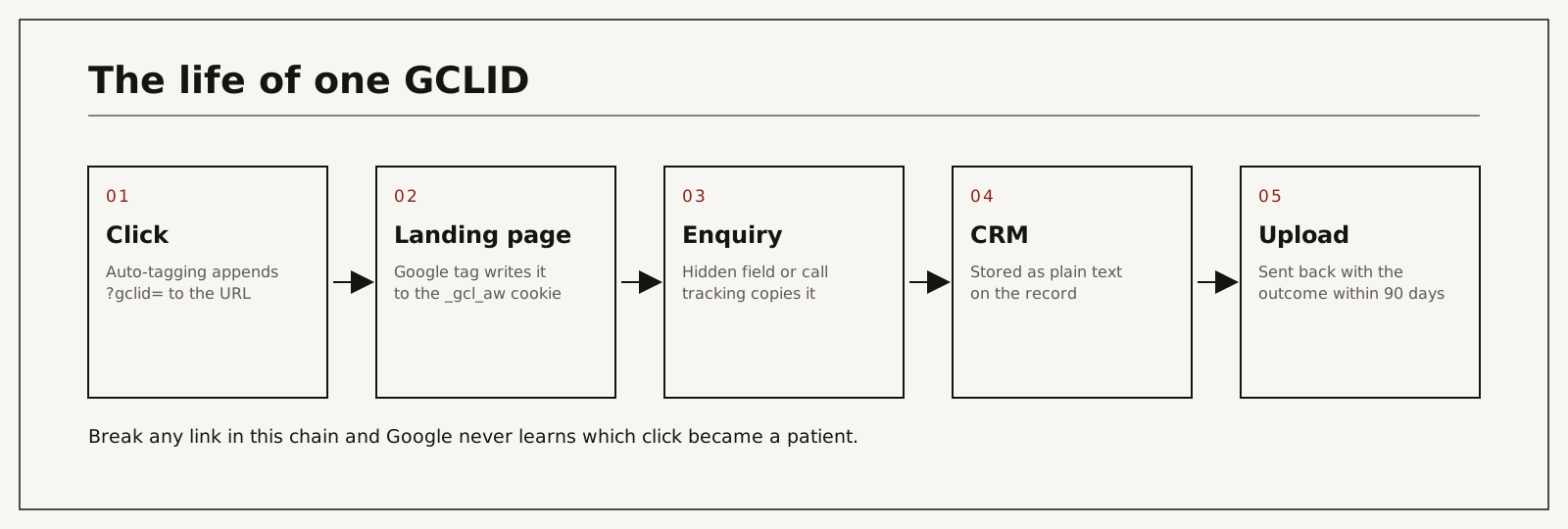
The GCLID itself never changes, but Google only accepts it for an offline conversion within 90 days of the click, the maximum click-through conversion window. On your site, the Google tag keeps it in a first-party cookie that lasts 90 days by default. In practice it persists only as long as you store it: capture it on the landing page, write it to the lead record, and it stays usable until the 90-day window closes.
What is a GCLID in Google Ads?
A GCLID is the identifier Google Ads attaches to each ad click when auto-tagging is turned on. Google stores it alongside everything it knows about that click: campaign, ad group, keyword, ad, device, time. When the same ID comes back later with an outcome attached, Google credits the outcome to that click. Google's own definition is one paragraph long and says the same thing.
Auto-tagging is an account-level setting and is normally on by default. Google documents it under about auto-tagging. If it is off, there is no GCLID, and nothing in the rest of this article works.
What a GCLID looks like and where it lives
In the address bar it looks like this:
https://yourclinic.com/consultation/?gclid=EAIaIQobChMI4f...long-string...BwEThree details matter more than the rest.
It is long. Lengths vary and Google does not promise a maximum, so store it in a plain text field of at least 255 characters. A 50-character field will truncate it, and a truncated ID is a wrong ID.
It is case-sensitive. "BwE" and "bwe" are different values. Some CRMs, form tools and spreadsheet imports normalize text to lowercase. When that happens the upload fails with a "click not found" error and nobody connects the two events.
It lives in three places in sequence. First the URL. Then, if a Google tag with the conversion linker is on the page, a first-party cookie named _gcl_aw, which by default lasts 90 days. Then wherever you copy it: a hidden form field, a call tracking record, a booking tool parameter, and finally your CRM. The URL disappears the moment the visitor goes to a second page, which is why the cookie and the hidden field exist.
GCLID, gbraid, wbraid, UTM: what each one is for
| Parameter | Who sets it | Identifies | Used for | Can you upload conversions with it? |
|---|---|---|---|---|
| gclid | Google Ads auto-tagging | One ad click | Attribution, Analytics linking, offline imports | Yes |
| wbraid | Google Ads, on some iOS traffic | An aggregated click, web to web | Privacy-preserving measurement on iOS | Yes |
| gbraid | Google Ads, on some iOS traffic | An aggregated click, web to app | App conversion measurement on iOS | Yes |
| utm_source and friends | You, manually or by template | A campaign label | Reporting in analytics tools | No. Google Ads ignores them for imports |
| msclkid | Microsoft Advertising | One ad click | The same job in Microsoft Ads | Yes, in Microsoft Ads |
| fbclid | Meta | One ad click | Meta's own attribution | Through Meta's Conversions API |
Two practical points. Capture gbraid and wbraid in their own fields next to gclid, because on iPhone traffic one of them may arrive instead. Google's click conversion upload documentation accepts any one of the three per conversion, never two at once. And do not confuse UTMs with click IDs. UTMs tell you which campaign. A GCLID tells Google which click. Only the second one can teach bidding anything.
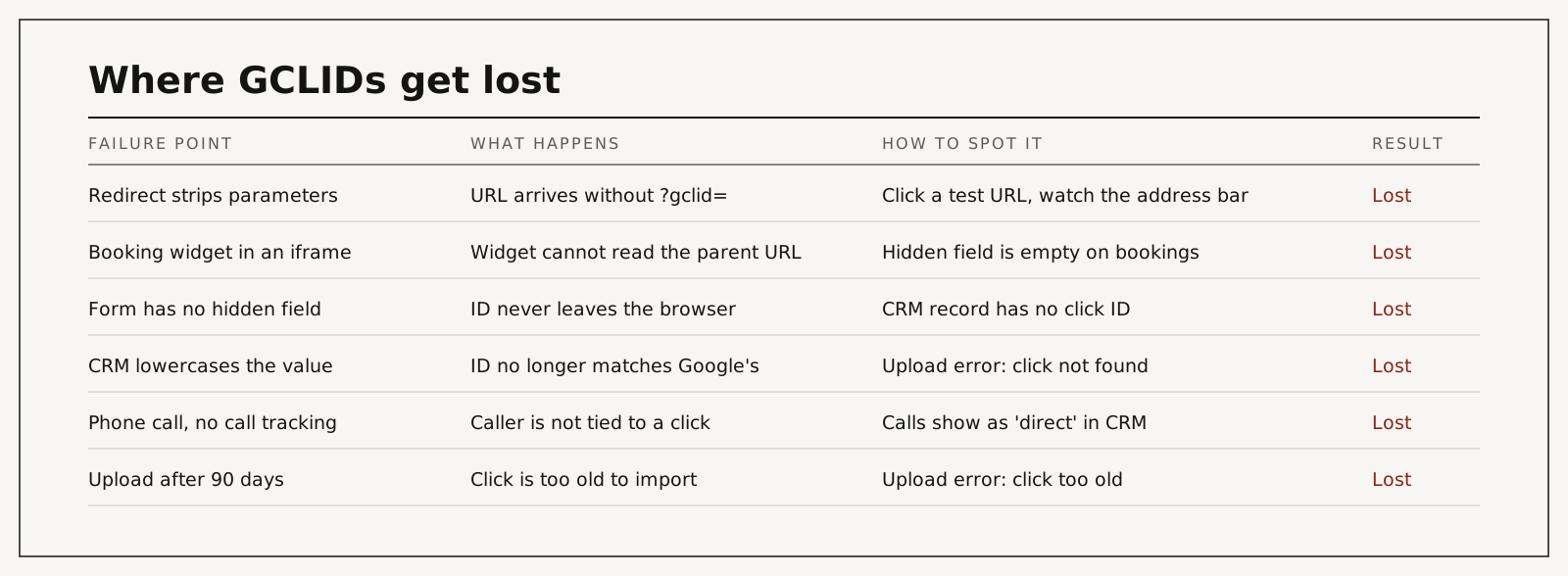
The six places clinics lose the GCLID
| Cause | What actually happens | Hidden cost | What you see in reports | Risk level |
|---|---|---|---|---|
| A redirect strips URL parameters | The visitor lands on a clean URL with no ID | Every click through that path is unattributable | Paid sessions with no click ID downstream | High |
| Booking widget loads in an iframe | The widget cannot read the parent page's URL or cookie | Direct bookers, your best leads, train nothing | Bookings in the CRM with an empty click ID | High |
| The form has no hidden field | The ID stays in the browser | All form leads lose attribution | CRM leads with source "website" and nothing else | High |
| The CRM or form tool changes the case | The stored value no longer matches Google's | Uploads fail quietly for weeks | "Click not found" in the import log | Medium |
| Phone calls are not tied to a click | The caller cannot be matched to an ad | Call-heavy practices under-report paid results badly | Calls recorded as direct | High |
| The outcome is uploaded after 90 days | Google rejects the click as too old | Long surgical cycles lose their final stage | "Click too old" in the import log | Medium |
The iframe case deserves a second look because it is invisible from the outside. I list the embed methods that keep the ID in HIPAA-compliant forms and click ID capture. The page looks fine, the booking works, the patient shows up. The only symptom is an empty field in a CRM nobody inspects. I have found it on sites that had been running ads for years.
The call case is the expensive one for clinics, where a large share of serious enquiries arrive by phone. Closing it means call tracking that passes the click ID through to the call record and then into the CRM. I describe the full loop in call tracking and the CRM, and the privacy side of it for dental practices in dental call tracking and HIPAA.
How to check yours in five minutes
You do not need to click your own ad, which costs money and skews data.
- Open your landing page with a test value added by hand: yourclinic.com/consultation/?gclid=TestABC123.
- Click through to a second page. The parameter will vanish from the URL. That is expected.
- Submit the form, or make a booking, as a test lead.
- Open the record in your CRM. The click ID field should read TestABC123 exactly, capitals included.
- Repeat for every entry point: each form, the booking widget, the chat, the call tracking number.
If any entry point returns an empty field, you have found a leak. If it returns testabc123, you have found the case problem. Both are cheap to fix once somebody knows they exist. Delete the test records when you are done.
If the browser side looks wrong, the conversion tracking setup and troubleshooting guide covers it.
Then check the other end. In Google Ads, open the conversion action that receives your imports and look at the upload history for errors. Google lists the common ones under offline conversions.
Is a GCLID personal data?
It depends on the law you are under, so here is the practical version.
To you, a GCLID is a meaningless string. To Google, it points to a click that may belong to a signed-in user. Under European law an online identifier like this is treated as personal data. Under US health privacy rules the question is whether, combined with what you send alongside it, it discloses identifiable health information to a vendor that has not signed a business associate agreement. Google does not sign one for Google Ads.
That is why the design of the upload matters more than the ID. If you send the ID with a neutral stage name and a time, you disclose very little. If you send it with a conversion named after a procedure, you disclose a lot. I go through the payload, the HHS guidance and the 2024 court decision in click-ID-only conversion feeds. I am a marketing consultant and not a lawyer, so take the payload to your privacy officer before it goes live.
What to do with it once you have it
Capturing the ID is half the job. The other half is sending it back with the truth attached.
When a lead reaches a real stage in your CRM, booked, attended, paid, you upload the ID with that stage and the time it happened. Google then sees which keywords and ads produce patients and which only produce forms. That is Google Ads offline conversion tracking in one sentence. If your CRM is Salesforce, the build is written up step by step in GCLID in Salesforce: capture, store and import.
The difference this makes is not subtle. It is the mechanism behind the one result I quote: I inherited an underperforming account and rebuilt it; cost per acquisition came down by about 78% while spend grew. The campaigns changed too. But the campaigns could only be rebuilt because the account finally knew which clicks had become patients.
The paid audit covers one ad channel for one location: the account, the tracking and the path from enquiry to booked patient, ending with a prioritized fix list. It is $500, paid upfront, and credited toward setup if we work together.
You work with me directly. There are no account managers and no juniors.
15 minutes. With me, not a sales rep.
If the five-minute check turned up empty fields and you would rather have someone trace every entry point, that is part of my audit: capture, storage, upload and what Google is currently bidding toward, with a prioritized fix list at the end. The paid audit is $500 per channel, per location, paid upfront, and credited toward setup if we work together. You work with me directly. Book a call or write first. The ongoing version of this work is described under CRM attribution for Google Ads.
One field in your CRM decides what Google learns
If that field is empty, Google is learning from form fills, and you are paying for more of them. Run the five-minute test on every entry point this week. Fix the leaks before you change a single bid. Then send the ID back with a real outcome attached. If you want it traced end to end by one person who will also do the fixing, start with the audit.
Frequently asked questions
What does GCLID stand for?
Google Click Identifier. Google Ads generates one for every ad click when auto-tagging is on and adds it to the landing page URL as the gclid parameter.
How long is a GCLID valid?
For offline conversion uploads, Google accepts a click for up to 90 days, which is also the maximum click-through conversion window. The cookie that stores it on your site lasts 90 days by default as well.
Is the GCLID the same for one person across visits?
No. It identifies a click, not a person. Someone who clicks two ads a week apart has two different IDs. Store the first one and do not overwrite it unless you have decided on a different attribution rule.
Why is my GCLID field empty in the CRM?
The usual causes are a form with no hidden field, a booking widget in an iframe, a redirect that strips parameters, or a visitor who arrived from a source other than Google Ads. Test each entry point with a hand-typed ID to find which one.
Does Google Analytics need the GCLID?
GA4 uses it to join Google Ads click data to sessions when the two products are linked. That is separate from offline conversion imports, which go to Google Ads directly and do not pass through Analytics.
Can I use UTM parameters instead?
Not for this. UTMs label campaigns for your reports. Google Ads cannot match an uploaded outcome to a click using UTMs. Use both: UTMs for reading reports, the click ID for teaching bidding.
Who sets this up?
In my engagements, I do, including the forms, the CRM field, call tracking and the upload. Nothing is handed to a junior or subcontracted.
How do I verify it is working?
Three checks: recent paid leads in the CRM have a click ID with capitals intact, the upload log in Google Ads shows no recurring errors, and the imported stages move in the same direction as your CRM numbers month to month.
Sources and official documentation
Every technical claim above can be checked against the platform's own documentation.
- About auto-tagging (Google Ads Help)Auto-tagging adds the GCLID to your ad URLs, and it is on by default in new accounts.
- About offline conversion imports (Google Ads Help)How a GCLID saved with the lead goes back to Google Ads as an offline conversion, and that from June 15, 2026 these uploads run through the Data Manager API instead of the Google Ads API.