Notes
Google Ads Offline Conversion Tracking: How to Tell Google Which Clicks Became Customers
Offline conversion tracking lets you report outcomes that happen away from your website, such as an attended consultation, a signed contract or a paid invoice, back to Google Ads, matched to the original ad click by its click ID. Bidding then optimizes toward customers you can verify in your CRM and stops chasing form fills.
Key takeaways
- A form fill is a hope. When Smart Bidding optimizes on forms, it recruits people who fill in forms.
- Four fields go back: click ID, conversion name, time, and optionally a value. No names, emails or phone numbers.
- Capture decides everything. Below roughly 80% of paid leads carrying a click ID, bidding learns from a biased sample.
- Run a scheduled CSV as the source of truth, or an API connection reconciled against one. Never an API alone on an account that matters.
- Google accepts a click for up to 90 days. Long sales cycles need an earlier verified stage.
- Low volume is the usual reason this gets built and then abandoned. Bid on a mid-funnel stage and judge on cost per verified customer.
Contents
- What is offline conversion tracking in Google Ads?
- Why the platform's numbers look better than your bank account
- What gets sent back, and what does not
- How to build it, in order
- CSV, API or Data Manager
- The failure modes nobody warns you about
- The volume problem
- Healthcare: what changes
- What it costs, by route
- Build it in-house, through the agency, or with a consultant
- What to check in your own account this week
- What this changes, and the uncomfortable middle
- Stop paying for form fills
Almost every owner has had this conversation. The dashboard says 84 conversions last month. The front desk says the schedule was not noticeably fuller. Both are telling the truth.
A conversion in Google Ads means whatever you told it to mean, and by default that is a form submission or a tap on a phone number. Neither is a customer. In any business with a sales process, elective healthcare, legal intake, B2B, home services quotes, the distance between "submitted a form" and "became revenue" is where most ad spend dies.
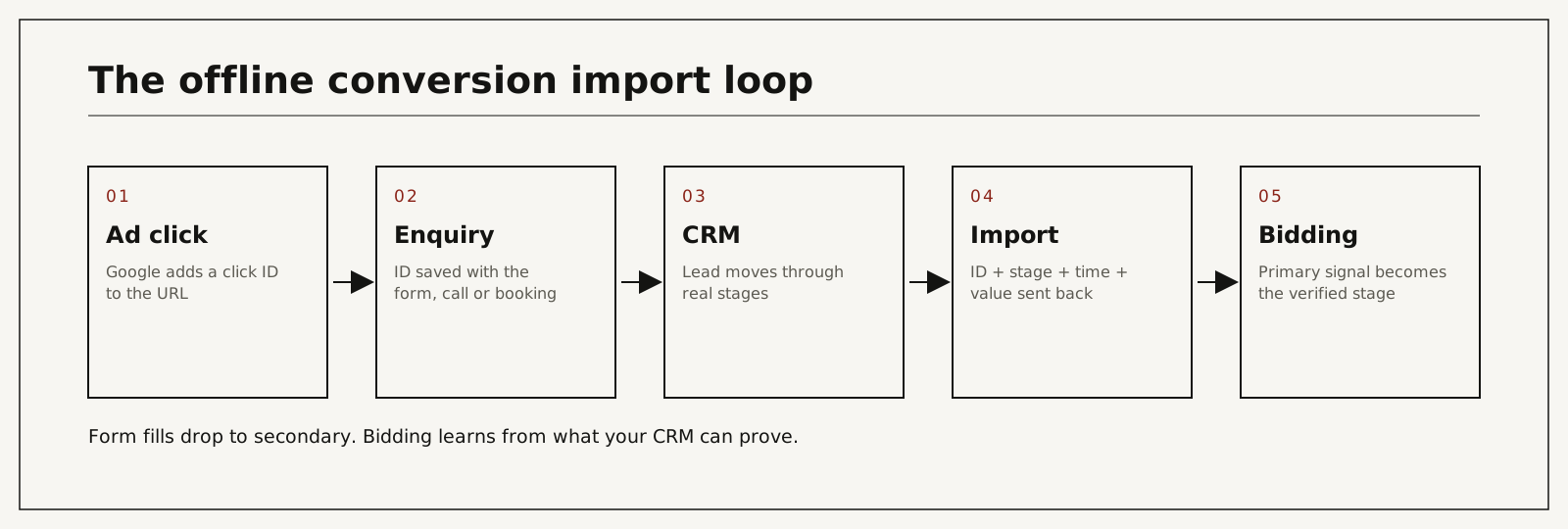
What is offline conversion tracking in Google Ads?
Offline conversion tracking is a Google Ads feature that imports outcomes recorded in your own systems and matches each one to the ad click that started it. The match is made with the Google click ID stored on the lead record, or with hashed contact details through enhanced conversions for leads. Google describes the feature under about offline conversion imports.
It is different from the tag on your thank-you page. That tag reports what happened in the browser. An import reports what happened in your business. If browser tracking is what you need to fix first, that is a separate guide: Google Ads conversion tracking, setup and troubleshooting.
Why the platform's numbers look better than your bank account
Between the enquiry and the revenue there are usually five steps. The enquiry has to be answered, qualified, turned into a booked consultation, attended, and converted into treatment or a signed deal. Each one leaks.
This matters more than it sounds, because Google's bidding is active. Smart Bidding searches for more of whatever you defined as success. Define success as a form fill and it finds the audiences most likely to fill in forms: price shoppers, students writing papers, people three states away, competitors. It is optimizing perfectly, toward the wrong thing. I go deeper into that loop in Smart Bidding on an incomplete signal and into the reporting gap in why Google Ads conversions do not match the CRM.
What gets sent back, and what does not
| Field | What it is |
|---|---|
| Click ID | The string Google added to the URL at the click. See what a GCLID is |
| Conversion name | A label you chose, such as "Stage 2" or "Consultation attended" |
| Time | When the outcome happened |
| Value (optional) | What the outcome is worth to you, or a flat weight |
No names. No phone numbers. No email addresses. Nothing from a medical record.
One correction to a line you will read elsewhere, including in older versions of this page. The click ID is a pseudonymous string to you, but Google issued it and can connect it to the click and often to a signed-in user. So the import is a small disclosure and not a zero disclosure. For regulated businesses that changes how you name conversions, which I cover below and in full in click-ID-only conversion feeds.
How to build it, in order
1. Capture the click ID
When someone arrives from an ad, Google appends the ID to the landing page URL. It has to be caught at that moment and stored on the lead record when the form is submitted or the call is logged. A hidden field plus a small script does it. This is the most important step, and the one where accounts silently break: a form embedded from a third-party booking tool often drops the parameter, a redirect loses it, a phone call without call tracking never had one.
2. Choose the outcome that matters
Not the enquiry. Pick the first point where the person has shown real commitment and where your data is reliable. For most practices that is consultation attended, not consultation booked. No-shows are a large share of bookings, and counting them teaches bidding to find more people who book and vanish.
3. Assign values that mean something
A consultation for a full-arch reconstruction and one for a single filling should not carry the same value. Differentiated values move bidding from volume toward money. If real prices would reveal the procedure, use weights such as 1, 5 and 20.
4. Send it back on a schedule
Daily for any account with meaningful spend. Bidding weights recent data, and weekly batches slow learning. For a very small account a weekly manual upload is acceptable for a while. Manual uploads tend to be forgotten in the second month, and a gap in the data is worse than no data because it teaches something false. Google's upload instructions are under upload offline conversions.
5. Wait before you change bidding
Create the new conversion action as secondary and let roughly 30 days of clean imports accumulate. Pointing a campaign at a conversion action with no history is how accounts stall for six weeks. Then make the imported stage primary and demote form fills to secondary.
6. Check which pipe you are using
Through 2026 Google has been consolidating offline imports and enhanced conversions for leads into Data Manager, with older API routes closing behind it. The logic does not change: an ID, an outcome, a time, a value. The route does, and setups built two or three years ago are the ones that break without anyone noticing.
CSV, API or Data Manager
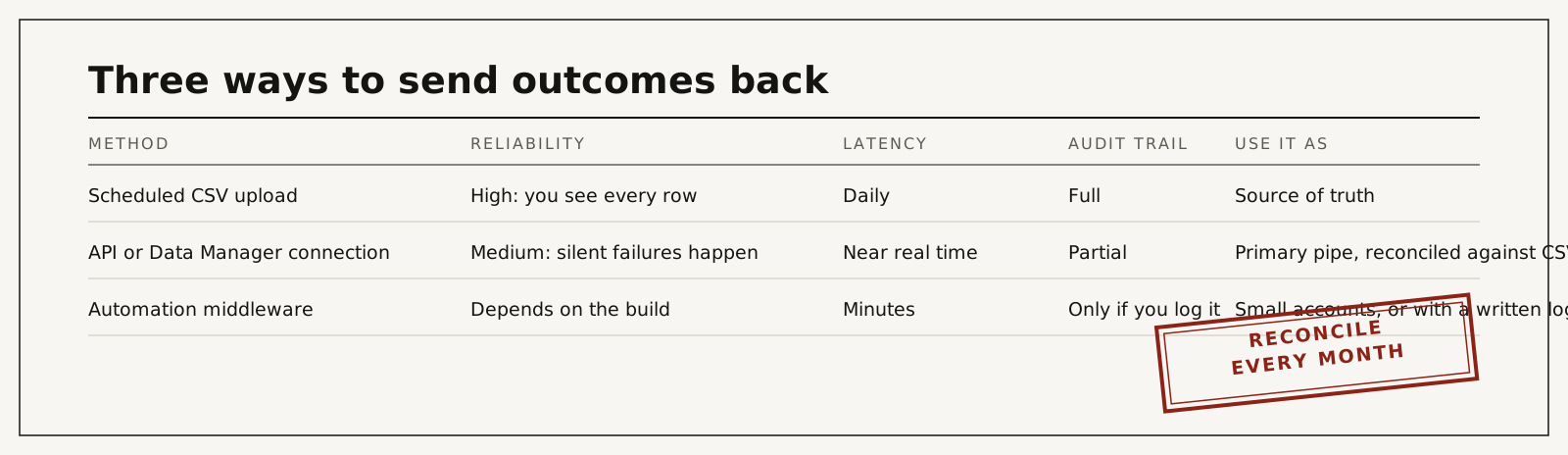
| Method | Reliability | Latency | Audit trail | Verdict |
|---|---|---|---|---|
| Scheduled CSV upload | High. You see every row | Daily | Full | Source of truth |
| API or Data Manager connection | Medium. Silent failures happen | Near real time | Partial | Use with periodic CSV reconciliation |
| Automation middleware | Depends on the build | Minutes | Only if you log every send | Small accounts, or with a written log |
My standing position: run a scheduled CSV import as the source of truth, or an API connection with periodic CSV reconciliation. Never an API alone on a revenue-critical account. Webhooks fail, statuses flip back and forth, deduplication breaks between objects, and none of it raises an alarm.
If your CRM is Salesforce, the exact build is in GCLID to Salesforce offline conversion import. The phone half of the problem is in call tracking and the CRM.
GA4 can also receive offline events through the Measurement Protocol, which is useful for reporting. It does not feed Google Ads bidding the way a direct import does. If the goal is smarter bidding, import to Google Ads directly and keep GA4 for analysis.
The failure modes nobody warns you about
| Cause | What actually happens | Hidden cost | What you see in reports | Risk level |
|---|---|---|---|---|
| Lost click IDs: multi-step forms, call-only paths, CRM merges | Outcomes cannot be matched | Bidding learns from a biased sample | Coverage below about 80% of paid leads | High |
| API pipeline drops events silently | Some outcomes never arrive | Under-reported results, wrong budget decisions | Import totals drift below CRM totals | High |
| Outcome arrives after 90 days | Google rejects the click as too old | Long cycles lose their final stage | "Click too old" in diagnostics | Medium |
| Timezone or timestamp format errors | A share of rows fail | Partial data looks like complete data | Row errors in the upload report | Medium |
| Status flips back and forth in the CRM | The same outcome is sent twice, or retracted | Inflated or unstable numbers | Duplicates, or adjustments nobody planned | Medium |
| Imported action made primary on day one | Bidding has no history to work from | Weeks of stalled delivery | Spend drops sharply after the switch | High |
| Too few outcomes per month | The algorithm cannot find a pattern | Feature abandoned as "not working" | Erratic spend and cost per conversion | High |
| Procedure names used as conversion names | Health detail disclosed with every upload | A privacy problem created by the fix | Conversion list reads like a service menu | High |
Google documents the time limit under its import requirements. In elective healthcare, where months can pass between enquiry and treatment, that limit is a design decision and not a footnote.
The volume problem
There is a real constraint here, and any consultant who does not raise it is either inexperienced or selling you something.
Smart Bidding needs signal. If your practice converts eight patients a month, feeding the algorithm eight events a month is not enough for it to find a pattern. It will thrash, or it will stop spending. This is the most common reason offline imports are implemented and then abandoned.
The way through is to bid toward a mid-funnel event that happens often enough to teach the algorithm, such as a qualified enquiry or a booked consultation, while holding cost per verified patient as the number you judge performance by. Those are two different jobs. Treating them as one is how accounts with good tracking still end up managed badly.
Healthcare: what changes
The mechanism is identical. Three things are stricter.
Conversion names stay neutral. "Stage 2" or "Consultation attended", never a procedure or condition.
Enhanced conversions for leads, which match on hashed email or phone, are a privacy decision before they are a marketing one. Google's description is under enhanced conversions for leads. For a clinic, the click-ID route usually discloses less.
Someone with authority signs off on the payload. The import carries no name or record, but whether your configuration meets HIPAA, or PHIPA and the Health Information Act in Canada, is a question for your privacy officer or counsel and not for your marketer. I lay out the sources in the click-ID-only article linked above, and the wider setup under HIPAA-compliant conversion tracking.
What it costs, by route
Market figures were checked in September 2026 for the US and Canada. They are ranges, not quotes.
| Route | Typical cost | Time to first verified import | What it depends on |
|---|---|---|---|
| Manual CSV from a spreadsheet | Staff time only | Days | Someone recording the click ID at enquiry |
| Developer builds capture and export | Typically a few hours of work for capture, more with booking tools and call tracking. Upwork lists tag manager specialists at $20 to $49 an hour (median $30); senior US consultants quote $85 to $175 | Days to weeks | Forms, booking tool, call tracking, CRM API |
| Agency adds it | 2026 agency price guides put one-time setup fees between $500 and $5,000, up to $10,000 for complex accounts, on top of management at 10% to 20% of ad spend | Depends on their queue | Whether the agency is given CRM access |
| I build it, fixed scope or inside management | Audit at $500 per ad account, credited toward the first month. The build is a fixed quote from the audit, or included in my $5,000 a month management retainer | Scoped in the audit. Bidding switches after about 30 clean days | Entry points, CRM, sign-off process |
| Leave it | No invoice | Never | Every month on form-fill bidding compounds |
Build it in-house, through the agency, or with a consultant
| Option | Cost | Time to result | Risk | When it makes sense |
|---|---|---|---|---|
| In-house | Lowest cash cost | Slow unless someone owns it | Capture gaps nobody tests | You have a developer and a marketer who talk to each other |
| Through your agency | Usually extra | Medium | Many agencies never see the CRM, so they cannot verify | The agency already reports on CRM stages |
| Consultant | Fixed project | Fast | Depends on one person | You want it built, documented and handed over |
| Do nothing | None | None | Bidding keeps learning from forms | Rarely. Only when volume is too low for any signal |
An agency is the right choice when it already works inside your CRM. If it has never asked for CRM access, that tells you what its reports are based on.
What to check in your own account this week
- Open your conversion actions. How many are primary? More than one or two means bidding is pulled in several directions.
- Look at what the primary actions are. If they are all forms and phone clicks, no outcome data reaches the platform.
- Submit a test enquiry from a URL with a hand-typed click ID. Does it land on the CRM record, capitals intact?
- Ask whoever answers the phone how many of last month's enquiries became attended consultations. Put that next to the dashboard number.
- Check every form, including the one embedded from your booking software.
- Confirm auto-tagging is on. Without it there is no click ID to capture.
What this changes, and the uncomfortable middle
Once outcomes flow back, three things happen in sequence. First, reporting stops flattering you. The real cost per patient is usually several times the reported cost per conversion, and seeing it is uncomfortable. Second, bidding shifts budget toward audiences and queries that produce attended consultations, which often looks like fewer leads at first. Third, over the following two months, cost per patient falls while lead volume stays flat or drops.
That middle phase is where most owners lose their nerve and revert. Lead count is going down, the dashboard looks worse, and the instinct is that something broke. Nothing broke. The account stopped buying leads and started buying patients.
From a live engagement: I inherited an underperforming account and rebuilt it; cost per acquisition came down by about 78% while spend grew. Same market, same services, same competitors. The account had been optimizing toward the wrong signal. The case write-up is here.
The audit covers your ad account, the tracking and the path from enquiry to booked patient, and ends with a 90-day plan. It is credited toward the first month if you continue with me.
You work with me directly. There are no account managers and no juniors.
I build the click-ID-to-CRM loop as a fixed-scope project or as part of full account management: verified in your CRM, documented, handed over. The ongoing service is CRM-verified attribution. The audit is $500 per ad account, comes with a 90-day plan, and is credited toward the first month if you continue with me. You work with me directly. Book a call or write first.
Stop paying for form fills
Your account is optimizing toward something today. If you have never sent outcomes back, that something is the cheapest thing your campaigns can produce. Run the weekly check above. If click IDs are missing, fix capture before anything else. If they are present, choose one verified stage, send it daily, wait 30 days, and then let bidding see it. If you would like the loop built and documented by one person, start with the audit.
Frequently asked questions
Does offline conversion tracking work with Performance Max?
Yes. Performance Max respects imported conversions like any campaign type. It is one of the few reliable quality levers you have there, because imported outcomes steer its automation toward real customers. More in what Performance Max is and when to trust it.
What is the difference between offline conversion import and enhanced conversions for leads?
Enhanced conversions for leads match on hashed email or phone, which helps when click IDs are hard to keep. They can run together. Click-ID import is the more precise primary when capture is solid, and it discloses less.
How often should imports run?
Daily for any account with real spend. Bidding weights recent data, and weekly batches slow learning. A weekly manual upload is acceptable for a very small account while you automate.
How long after the click can I upload?
Up to 90 days. For longer cycles, send an earlier verified stage inside that window and keep the final outcome for your own reporting.
Do I need a developer?
Usually a small amount. Someone has to store the click ID on the lead record and expose the stage data. Most modern CRMs, including HubSpot and Salesforce, support the field and the export. For clinics, see what a BAA covers in a marketing CRM.
What if my CRM is a spreadsheet?
It still works and the upload is manual. What matters is that the click ID is recorded at the moment of enquiry.
Does this work with Microsoft Ads and Meta?
Yes. Microsoft has its own click ID and offline import. Meta uses the Conversions API. The principle is the same and the plumbing differs. I put the two search platforms side by side in Microsoft Ads vs Google Ads for high-ticket services.
Who does the work, and how do I verify it?
I do the work myself. You verify it in three places: the click ID field in your CRM, the upload diagnostics in Google Ads, and a monthly reconciliation of imported stages against CRM stages. If the three agree in direction, it is working.