Notes
Google Ads Conversion Tracking: Setup and Troubleshooting
Google Ads conversion tracking records what people do after an ad click: a form, a call, a booking. You define a conversion action, place a Google tag on the site, and tell it when to fire. The setup takes an hour. Most of the damage comes later, from settings that count the wrong thing or count it twice.
Key takeaways
- One outcome should be one primary conversion action. Everything else is secondary, visible in reports and ignored by bidding.
- For leads, set Count to One. "Every" is for purchases.
- A tag that fires is not proof of a patient. Browser tracking counts actions on your site. Only your CRM knows who booked and showed up.
- The most common fault I find is duplication: a GA4 import and a native tag both set as primary for the same form.
- Test with Tag Assistant on every path a person can take, including the booking tool and the phone number.
Contents
- How does Google Ads conversion tracking work?
- Setting it up properly, step by step
- The settings that change what Google learns
- Twelve faults, and how each one shows up
- A ten-minute test you can run yourself
- What it costs to fix, by route
- Fix it yourself, ask the agency, or bring someone in
- How I audit a setup
- Count fewer things, and count them once
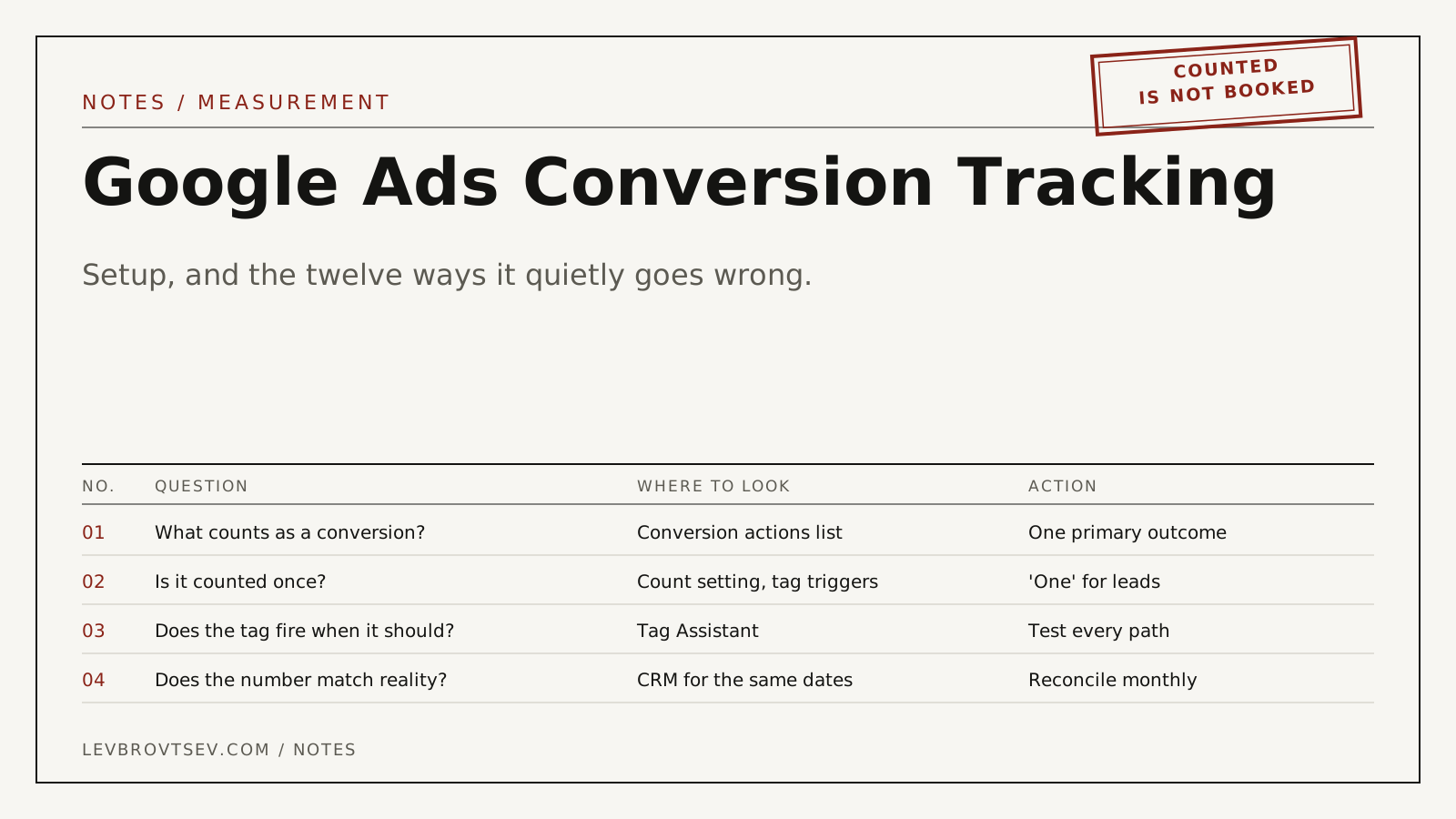
The number at the top of your Google Ads report is called Conversions. It looks like a fact. It is a setting. Somebody decided, possibly years ago and possibly by accepting a default, what gets counted in that column, how often, and whether Google should chase it.
If that decision was wrong, everything downstream is wrong too: cost per conversion, Smart Bidding, the agency's monthly slide. This guide covers the browser side of tracking, tags on your website. Sending results back from a CRM is a separate job, covered in my Google Ads offline conversion tracking guide.
How does Google Ads conversion tracking work?
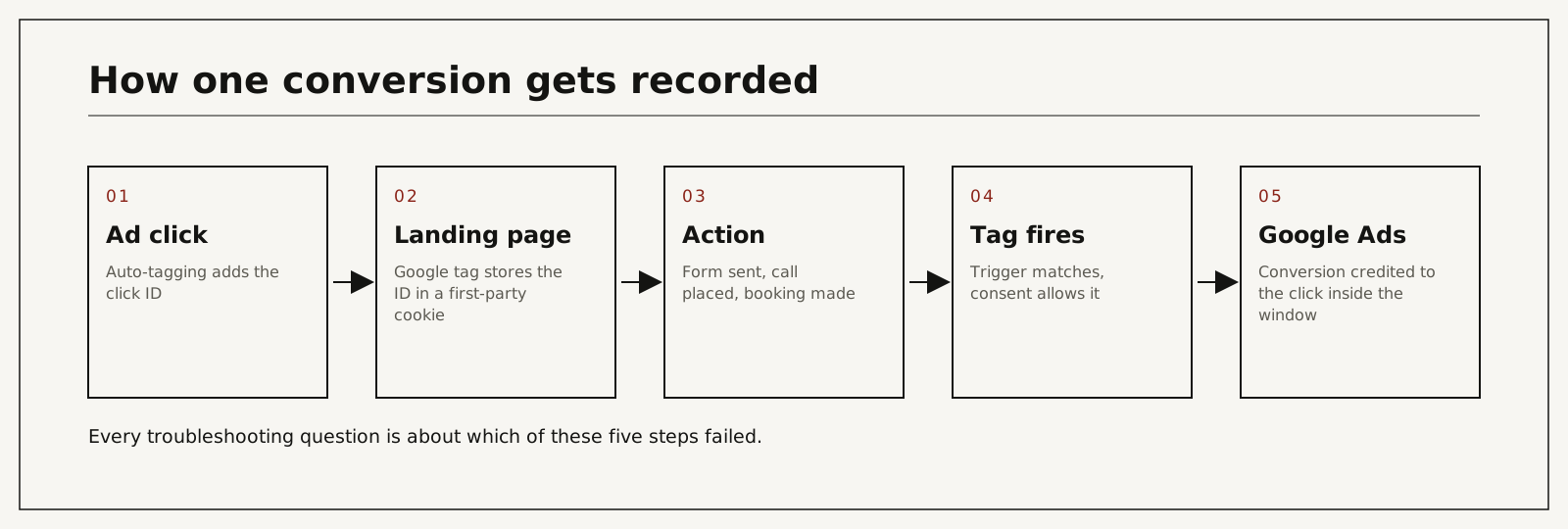
Google Ads conversion tracking works by matching an action on your website to an earlier ad click. Auto-tagging adds a click ID to the landing page URL, the Google tag stores it in a first-party cookie, and when your conversion trigger fires, the tag sends the event with that ID. Google credits the click if it falls inside the conversion window.
Google's own overview is under about conversion tracking. If the click ID is new to you, start with what a GCLID is.
Setting it up properly, step by step
- Decide the outcome before you open Google Ads. For a clinic it is usually a consultation request, a booked appointment or a qualified call. Write it down in one sentence.
- In Google Ads, open Goals, then Conversions, and create a conversion action. Choose the category that matches the outcome. Name it so a stranger would understand it: "Consultation form sent", not "Conv 2".
- Set Count to One for anything lead-like.
- Set a value only if it means something. A flat value per action is fine. An invented revenue figure is worse than none.
- Install the Google tag, directly or through Google Tag Manager, on every page. In Tag Manager, add the conversion linker tag so the click ID is stored.
- Create the trigger. A thank-you page view is the most reliable. A form submission event is next. A button click is the least reliable because it fires whether or not the form was valid.
- For calls, use Google's call conversion for numbers on the site, or your call tracking provider's integration, and set a minimum call length.
- If you serve visitors in Europe or the UK, set up consent mode so the tag respects the cookie banner.
- Test every path with Tag Assistant before you trust a single number.
- Mark one action as primary for bidding. Mark the rest secondary.
Steps one and ten are where accounts go wrong. The middle is mechanical.
The settings that change what Google learns
Primary and secondary
Primary actions appear in the Conversions column and steer Smart Bidding. Secondary actions are reported under All conversions and steer nothing. If "Clicked phone number", "Viewed contact page" and "Form sent" are all primary, Google optimizes toward whichever is cheapest to produce. That is never the form. Performance Max is where this hurts most, as I explain in what Performance Max is and when to trust it.
Count
"Every" counts each repeat action after one click. One person who submits a form three times becomes three conversions. For leads, use "One".
Conversion window
The default click-through window is 30 days and the maximum is 90. If your patients take six weeks to enquire after first clicking, a 30-day window is hiding them.
Attribution model
Data-driven is the default. It spreads credit across clicks, which is why you see fractions like 0.4 of a conversion. Google documents the options under about attribution models.
Enhanced conversions
This sends hashed contact details from the form to improve matching. For healthcare that is a privacy decision before it is a marketing one. I lay out the options in click-ID-only conversion feeds. On analytics specifically, see whether Google Analytics is HIPAA compliant.
Twelve faults, and how each one shows up
| Cause | What actually happens | Hidden cost | What you see in reports | Risk level |
|---|---|---|---|---|
| GA4 import and native tag both primary | One form, two conversions | Cost per conversion looks half of what it is | Conversions jump on the day the import was added | High |
| Count set to Every on a lead form | Repeat submissions multiply | Inflated totals, bidding favors repeat clickers | Conversions exceed form entries in the inbox | Medium |
| Button click used as the trigger | Fires on failed and abandoned submits | Google learns from people who never sent anything | More conversions than leads received | High |
| Thank-you page reachable without the form | Bookmarks, refreshes and crawlers count | Slow, invisible inflation | Conversions at odd hours with no leads | Medium |
| Phone number clicks set as primary | Taps count, calls do not | Mobile traffic looks brilliant and produces little | High mobile conversion rate, quiet phones | High |
| Page views or scrolls set as primary | Bidding chases browsers | Budget drifts to the cheapest traffic | Conversion volume up, enquiries flat | High |
| Booking tool on another domain or in an iframe | The action happens where your tag cannot see it | Your best prospects are invisible | Bookings in the calendar, none in Google Ads | High |
| Conversion linker missing in Tag Manager | Click ID never stored | Conversions on the landing page only, none after navigation | Sharp undercount | Medium |
| Consent mode absent or misconfigured | Tags blocked or firing without consent | Undercounting, or a compliance problem | Drop on the day the cookie banner went live | Medium |
| Auto-tagging turned off | No click ID at all | Nothing can be matched | Status shows no recent conversions | High |
| Tag removed in a site redesign | Tracking stops silently | Weeks of blind bidding | Status: inactive or no recent conversions | High |
| Conversion lives in a different account | Manager-level and account-level actions conflict | Campaigns optimize to an action nobody checks | Goals in the campaign differ from the ones in your report | Medium |
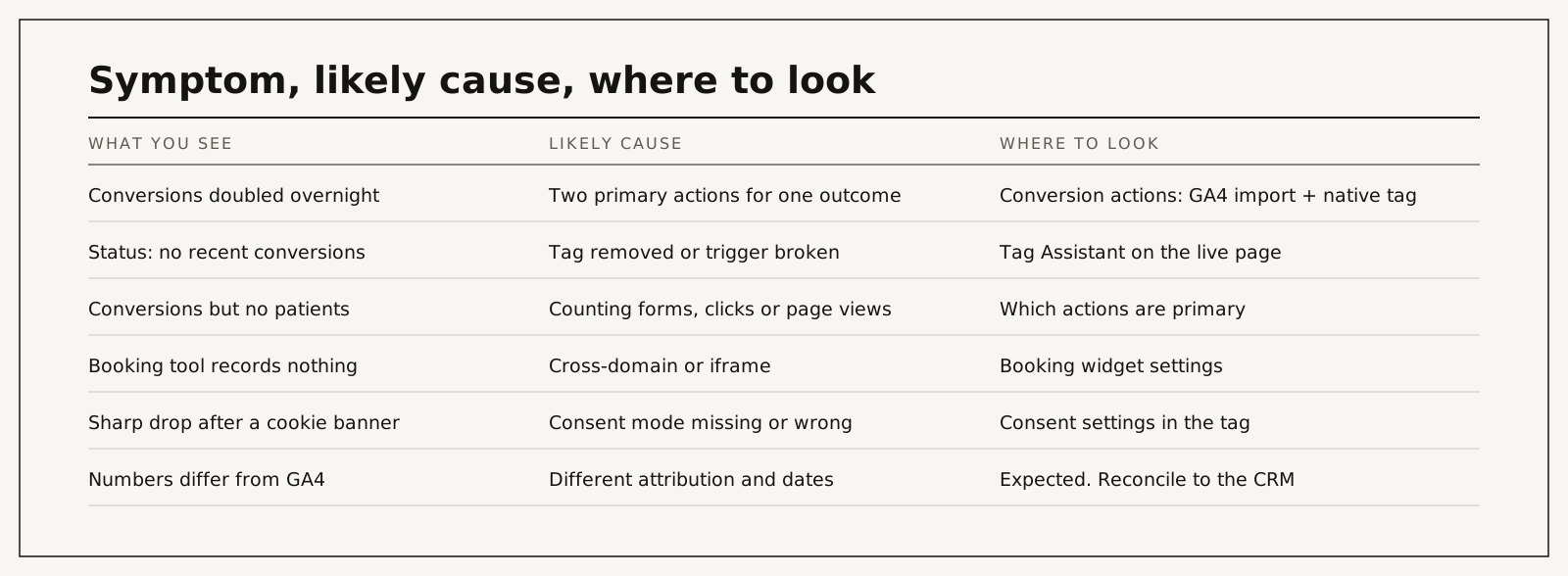
The first row is the one I find most. Someone links GA4, imports its key events "to be safe", and leaves the original tag in place. From that day the account reports twice the results at half the cost, and everybody is pleased. I wrote about the downstream effect in why Google Ads conversions do not match the CRM.
A ten-minute test you can run yourself
- Open the Conversions summary. Count the actions marked primary. If it is more than one or two, write down what each one records.
- Open each primary action and read three settings: source, count, window.
- Put last month's primary conversions next to the enquiries your front desk actually received. A gap of a few percent is normal. Double is a duplicate.
- Open Tag Assistant, connect to your site, and submit a test form. One conversion event should fire. Two means duplication. None means a broken trigger.
- Repeat on the booking tool, and on a phone.
You will not break anything by looking. If what you find matches the table above, you now know what to ask for.
What it costs to fix, by route
| Route | Typical cost | Time to a clean setup | What it depends on |
|---|---|---|---|
| You or your web person, using this guide | Hours of your time. If you hire help by the hour, Upwork lists tag manager specialists at $20 to $49 (median $30); senior US consultants quote $85 to $175 | Days | Access to Tag Manager and Google Ads, a simple site |
| Your current agency corrects it | Usually inside the retainer. If billed separately, 2026 agency price guides put one-time tracking and setup work between $500 and $5,000 | Depends on their queue | Whether they accept that the numbers they reported were inflated |
| I audit and fix it | Paid audit $500 per channel, credited toward setup. Setup from $1,500 | Scoped in the audit | Number of forms, booking tool, call tracking, consent setup |
| Leave it | No invoice | Never | Each month of inflated data teaches bidding the wrong lesson |
Fixing a duplicate has an awkward side effect worth knowing in advance. The reported conversion count falls, often by half, on the day you fix it. Nothing got worse. The report got honest. Warn whoever reads the monthly numbers before you make the change.
Fix it yourself, ask the agency, or bring someone in
| Option | Cost | Time to result | Risk | When it makes sense |
|---|---|---|---|---|
| Fix it yourself | Lowest | Fast for simple sites | Missing a second fault behind the first | One form, no booking tool, someone comfortable in Tag Manager |
| Ask the agency | Included | Depends on them | They are marking their own homework | The relationship is good and they did not build the fault |
| Independent audit | Fixed fee | Fast | Low | Numbers and reality disagree and you want a neutral read |
| Do nothing | None | None | Compounding | Never |
Agencies are often the right choice here. They have the access and the history. The one case where I would not ask them first is when the inflated number has been the headline of their reports for a year.
How I audit a setup
I start from your CRM or inbox, not from Google Ads. I take last month's real enquiries and try to find each one in the account. Whatever cannot be found is a capture problem. Whatever appears twice is a duplication problem. Whatever appears and was never a real enquiry is a trigger problem.
Then I check every entry point with Tag Assistant, reduce primary actions to the one outcome that matters, move everything else to secondary, and document what each action means in plain words. Last, I connect it to the CRM so that bidding can be judged on patients. That is the step that produced the one result I quote: I inherited an underperforming account and rebuilt it; cost per acquisition came down by about 78% while spend grew.
After 30 days you have one number you can defend. After 60, bidding has adjusted to it. After 90 you can see which campaigns were being flattered by the old setup.
The paid audit covers one ad channel for one location: the account, the tracking and the path from enquiry to booked patient, ending with a prioritized fix list. It is $500, paid upfront, and credited toward setup if we work together.
You work with me directly. There are no account managers and no juniors.
15 minutes. With me, not a sales rep.
If the ten-minute test left you with more questions than answers, a conversion tracking audit is the way to settle it: every action, every trigger, every entry point, with a written list of what to change. The paid audit is $500 per channel, per location, paid upfront, and credited toward setup if we work together. You work with me directly. Book a call or write first.
Count fewer things, and count them once
Open the Conversions page and read what is marked primary. If the list includes clicks, page views or two versions of the same form, Google has been learning from noise, and your cost per conversion is a fiction. Reduce it to one real outcome, counted once, tested on every path. Then connect it to what happened next. If you would like a neutral read before you change anything, start with the audit.
Frequently asked questions
Why does Google Ads show more conversions than I received leads?
Almost always duplication or a loose trigger: two primary actions for one form, Count set to Every, a button-click trigger, or a thank-you page that can be reloaded. Put one week of conversions next to one week of real enquiries to find which.
Should I import conversions from GA4 or use the Google Ads tag?
Either works. Both at once, as primary, does not. Pick one source per outcome. Many accounts keep the native tag as primary and the GA4 import as secondary for comparison.
What does "no recent conversions" mean?
The tag has not reported that action recently. Either nothing happened, or the tag or trigger is broken, often after a site change. Test with Tag Assistant before assuming demand dropped.
How long until conversions appear after setup?
A test conversion usually shows within a few hours and can take up to a day. Status changes from unverified to recording once Google has seen the tag fire.
Can I track phone calls?
Yes. Calls from ads, calls to a number on your site, and clicks on a mobile number are three different actions. Only the first two measure calls. Set a minimum length so wrong numbers do not count.
What does it cost to fix a broken setup?
For a simple site, a few hours. With several forms, a booking tool, call tracking and consent settings, it is a small project. For scale: Specialist freelancers on Upwork list tag and tracking work at $20 to $49 an hour (median $30); senior US consultants quote $85 to $175 an hour. My paid audit is $500 per channel, and setup starts from $1,500.
Who does the work?
I do: the audit, the Tag Manager changes, the testing and the write-up. Nothing is handed to a junior or subcontracted.
How do I verify it is right afterwards?
Once a month, put primary conversions next to the enquiries you actually received for the same dates. They should be close, and they should move together. If they drift apart, something changed on the site.