Notes
Performance Max Negative Keywords: What You Can Block and What You Cannot
Performance Max now accepts negative keywords at campaign and account level, negative keyword lists, and brand exclusions. What it still does not give you is bidding at the search-term level, the ability to switch off a whole channel, or health-audience targeting that ordinary advertisers take for granted. Exclusions tidy the edges. The conversion signal still decides the result.
Key takeaways
- Brand exclusions first. Without them, PMax takes credit for searches you already win.
- Negative keywords work, at campaign and account level, and through shared lists.
- Content exclusions remove some inventory types, but you cannot turn off Display or video entirely.
- You can see search terms. You cannot bid on them individually.
- In healthcare, audience-based exclusions are limited by the sensitive-category rules, which makes the conversion definition matter more, not less.
Contents
Your Performance Max campaign is spending on searches for your own brand, on job seekers, and on people looking for a free version of what you sell. The old advice was that you could do nothing about it. That advice is out of date, but only partly.
Can you add negative keywords to Performance Max?
Yes. Google now supports negative keywords in Performance Max at campaign level and at account level, including shared negative keyword lists. Brand exclusions are a separate, more reliable control specifically for brand traffic. Google documents the campaign type under about Performance Max.
What you can and cannot exclude
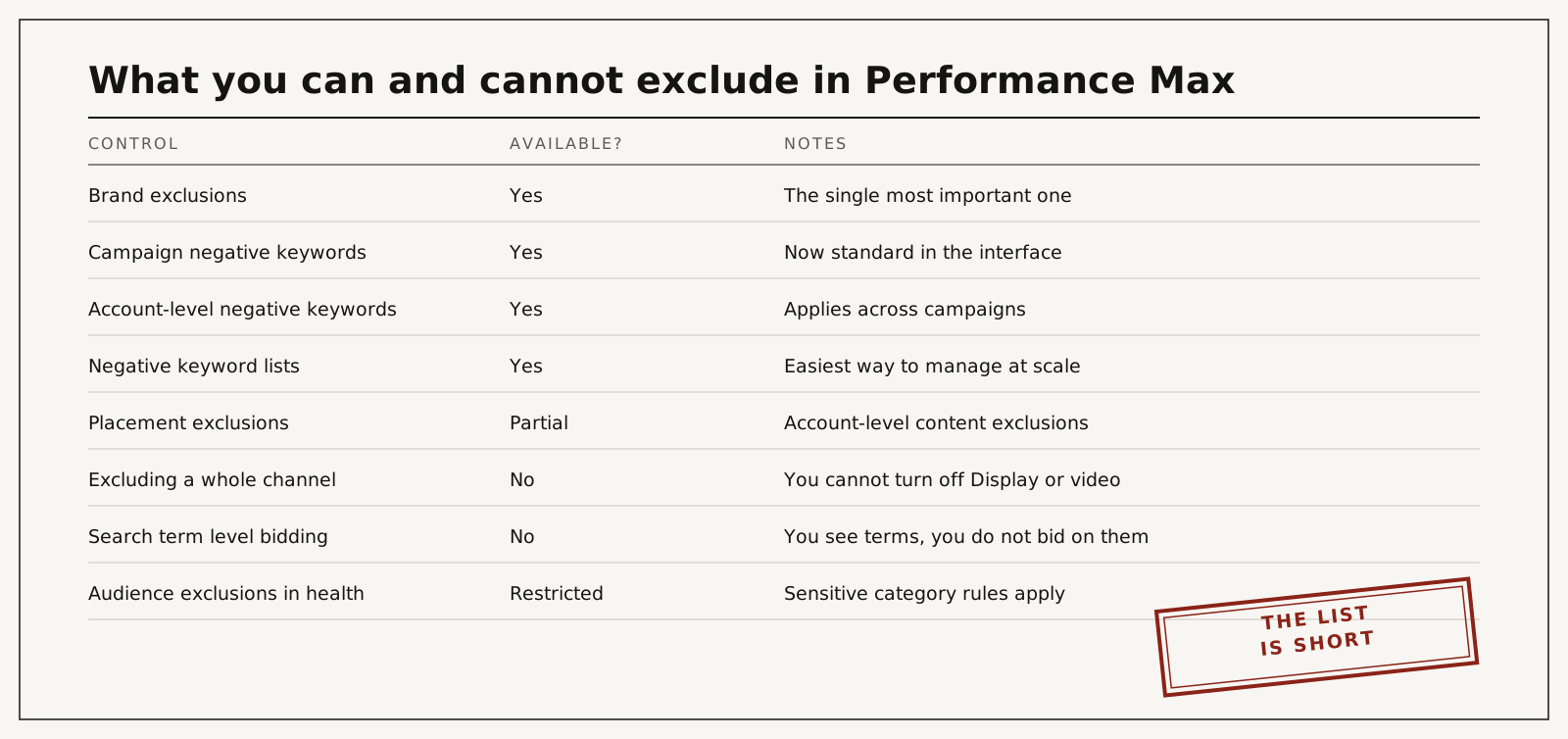
| Control | Available | Notes |
|---|---|---|
| Brand exclusions | Yes | The single most valuable one |
| Campaign negative keywords | Yes | Standard in the interface |
| Account-level negative keywords | Yes | Applies across campaigns |
| Negative keyword lists | Yes | Easiest way to manage at scale |
| Placement and content exclusions | Partial | Account-level content exclusions and some placement controls |
| Turning off a channel | No | You cannot disable Display or video within PMax |
| Bidding by search term | No | You see terms; you do not bid on them |
| Health-based audience targeting | Restricted | Sensitive-category rules apply |
Two of these are worth pausing on. You cannot exclude an entire surface, so if Display traffic is producing junk, the answer is the conversion signal rather than an exclusion. And in healthcare, the personalized advertising policy limits health-interest audiences, so audience signals do less for a clinic than for a retailer.
Brand exclusions come first
Before any keyword work, add brand exclusions. Without them Performance Max serves on searches for your own practice name, converts them cheaply, and reports itself as your best campaign while adding nothing you were not already going to get from your Search campaign or your organic listing.
The symptom is an excellent cost per conversion in PMax alongside falling brand Search volume. I take that apart in Performance Max and brand cannibalization.
The order to do it in
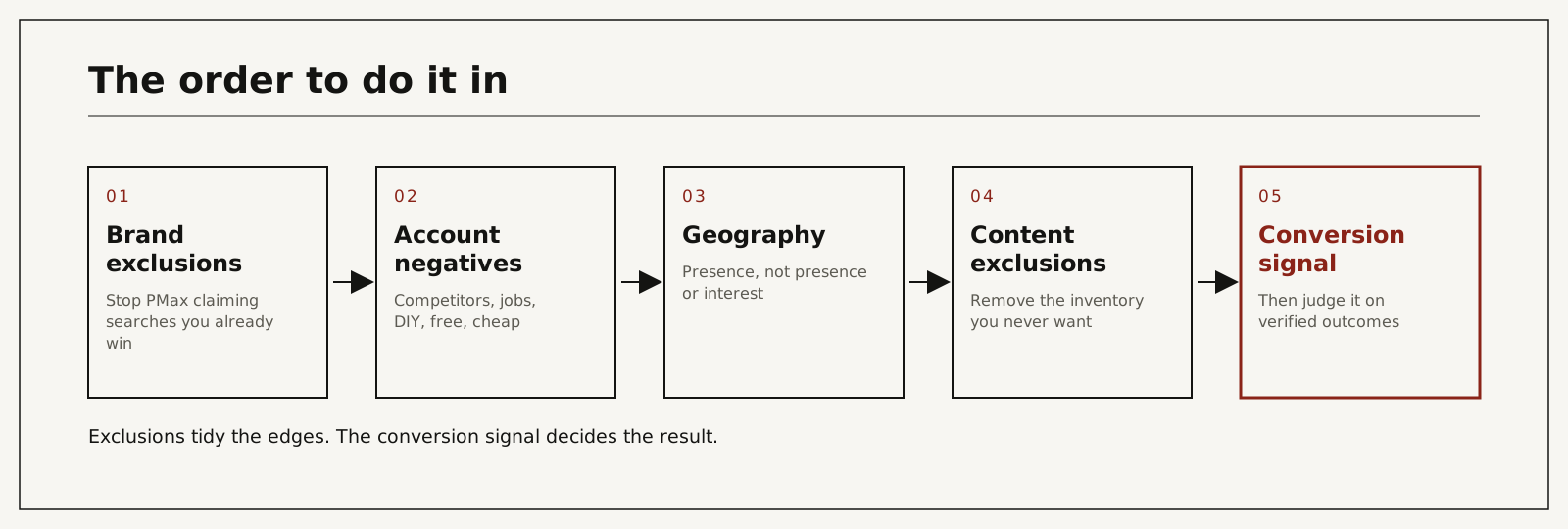
- Brand exclusions, so the campaign stops claiming demand you already own.
- Account-level negatives: competitor names, job and careers terms, "free", "cheap", "DIY", "courses", and anything you do not sell.
- Geography set to presence rather than presence or interest, especially for local services.
- Content exclusions for inventory you never want, and a review of final URL expansion so traffic is not sent to your careers page.
- Only then, the conversion signal: make a verified CRM stage the primary action and demote form fills to secondary.
Step five is the one that changes the outcome. The first four stop obvious waste; the fifth decides what the automation hunts for. The mechanism is in the offline conversion tracking guide.
What to exclude in a clinic account
A starting list, to be adapted to your field:
- Your own brand and common misspellings, through brand exclusions.
- Competitor practice names, unless you have a deliberate conquesting strategy and the budget for it.
- Job seeker terms: jobs, careers, hiring, salary, training, certification.
- Price-floor language you do not want to compete on: free, cheapest, discount, groupon, coupon.
- Services you do not offer, including procedures you refer out.
- Academic and research intent: study, statistics, journal, thesis.
- Insurance and billing questions if you are cash-pay only.
Review the search terms report monthly and add what appears. In a clinic account this takes fifteen minutes and usually removes a meaningful share of waste in the first month.
What goes wrong
| Cause | What actually happens | Hidden cost | What you see in reports | Risk level |
|---|---|---|---|---|
| No brand exclusions | PMax claims searches you already win | It looks like your best campaign while adding nothing | Great cost per conversion, falling brand Search volume | High |
| Negatives added only at campaign level | Other campaigns keep serving on them | Waste moves rather than stops | Same terms in a different campaign | Medium |
| Over-excluding | The campaign starves and loses learning | Delivery drops, costs rise | Spend falling without a budget change | Medium |
| Geography left on presence or interest | Ads shown far outside your service area | Enquiries you cannot serve | Leads from other states | Medium |
| Final URL expansion left open | Traffic sent to blog and careers pages | Clicks that could never convert | Landing page report full of irrelevant URLs | Medium |
| Expecting exclusions to fix quality | The real problem is the conversion definition | Months of tinkering at the edges | Conversions up, patients flat | High |
What it costs to fix
| Route | Typical cost | Time | What it depends on |
|---|---|---|---|
| Do it yourself with this list | An hour, then fifteen minutes monthly | Same day, then learning | Access to the account |
| Your agency does it | Usually inside a retainer of 10% to 20% of spend | Their queue | Whether they will report on outcomes |
| I clean it up | Paid audit $500 per channel, credited toward setup | Scoped in the audit, plus the learning period | Tracking state, number of services |
| Leave it | No invoice | Never | The campaign keeps optimising toward the wrong thing |
The paid audit covers one ad channel for one location: the account, the tracking and the path from enquiry to booked patient, ending with a prioritized fix list. It is $500, paid upfront, and credited toward setup if we work together.
You work with me directly. There are no account managers and no juniors.
15 minutes. With me, not a sales rep.
Exclude the edges, then fix the signal
Spend an hour on brand exclusions and an account-level negative list. Then spend the rest of the month on what Performance Max counts as a conversion, because that is the setting doing the real work. If you want both reviewed by someone who does this weekly, start with the audit, or see how a Performance Max cleanup runs.
Frequently asked questions
Can you add negative keywords to Performance Max?
Yes, at campaign and account level and through shared lists. Brand exclusions are a separate setting and should be applied first.
How many negative keywords should I add?
Enough to stop obvious waste, and no more. Over-excluding starves the campaign and restarts learning. Start with brand, competitors, jobs and price-floor terms.
Can I see Performance Max search terms?
Yes, at a summarised level. You can use them to build negatives. You cannot bid on them individually the way you can in a Search campaign.
Can I stop Performance Max serving on Display or YouTube?
Not entirely. You can apply content exclusions and some placement controls, but you cannot disable a channel. If those surfaces produce junk, fix what you count as a conversion.
Will adding negatives improve my results?
It removes waste. It does not change what the campaign is hunting for. The conversion definition does that.
Do brand exclusions reduce my conversions?
Reported conversions usually fall, because PMax stops claiming brand searches. Total business does not fall. Warn whoever reads the report before you make the change.
Who does the work if I hire you?
I do: the exclusions, the structure and the conversion signal. Nothing is subcontracted or delegated.
How do I verify it worked?
Watch brand Search impressions and conversions before and after the exclusion, and watch cost per verified outcome rather than cost per conversion. If brand Search recovers and verified outcomes hold, it worked.