Notes
Lead source tracking: how to know where every lead really came from
 LEV BROVTSEV · OCTOBER 20, 2026
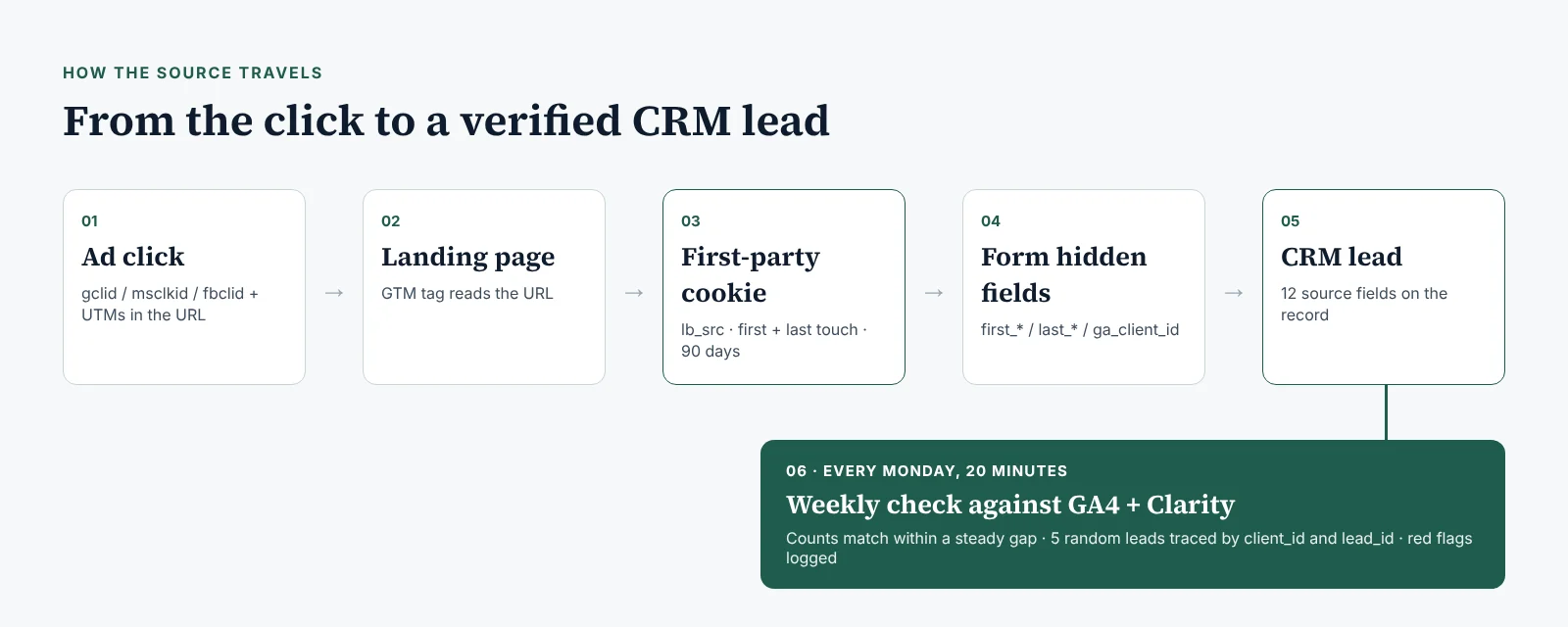
Lead source tracking means every lead in your CRM carries the channel, campaign, keyword, landing page and timestamp of the visit that produced it. The form captures those values itself; nobody types them in. Then once a week you check a handful of leads against GA4 and Microsoft Clarity, so you know the labels are true.
Most practices I talk to have a CRM full of leads and no reliable way to say which ad, which keyword or which page produced any of them. The agency report says "Google: 41 leads". The CRM says "Source: Google" on half the records and nothing on the rest. Nobody can connect the two. This is the setup I use to fix that. It's a cookie, some hidden form fields, two tools you already have for free, and a 20-minute check every week.
Key takeaways
- "How did you hear about us?" is a survey, not tracking. Capture the source from the URL and the click ID automatically.
- Store 12 fields on every lead, including first touch and last touch, so a patient who comes back a week later via "direct" keeps the original source.
- GA4 and Clarity don't sign a BAA. Send them sources and IDs, never names, emails, phone numbers or treatment details.
- The weekly check is the part that makes the data trustworthy: compare counts, then trace five real leads end to end.
Contents
Why "How did you hear about us?" isn't tracking
A self-reported source is what the patient remembers, or what the front desk picks from a dropdown while the phone is ringing. A captured source is what actually happened: the URL parameters and click ID from the visit, recorded by the form at the moment of submission.
The self-reported version fails in predictable ways:
- Patients say "Google" for a Google ad, a Google Maps listing, an organic result and a review they read on someone else's site. Those are four channels with four different costs.
- Staff pick the first option in the dropdown when they're busy. In most CRMs I open, that option is "Google" or "Website".
- Calls get logged as "walk-in" or "referral" because the caller didn't mention an ad.
Here's what that looks like at Example Dental Group, a fictional three-location practice. The owner sees 60 leads marked "Google" last month and raises the Google Ads budget. When the hidden fields go in, the same month splits into 22 paid search leads, 19 from the Maps listing, 11 organic and 8 with no source at all. The budget went to the wrong place, and nobody was lying. Nobody was measuring.
Keep the question on the form if you like. It's useful for referrals and word of mouth. Just don't let it be the record of where the lead came from.
The 12 fields every lead should carry
These are the fields I add to every lead record. All of them are filled automatically. None of them is personal or health information.
| Field | Where it comes from | Example value |
|---|---|---|
| utm_source | URL parameter on the ad or link | |
| utm_medium | URL parameter | cpc |
| utm_campaign | URL parameter | implants-search-tx |
| utm_term | URL parameter (the keyword, via ValueTrack {keyword}) | all on 4 dental implants cost |
| utm_content | URL parameter (the ad or creative) | rsa-financing-v2 |
| Click ID | Auto-tagging: gclid, gbraid or wbraid (Google), msclkid (Microsoft), fbclid (Meta) | gclid=Cj0KCQjw… |
| Landing page | The first page of the visit | /implants/full-arch/ |
| Referrer | The page the visitor came from | https://www.google.com/ or (direct) |
| First-touch timestamp | The first tagged visit, stored in the cookie | 2026-10-06T14:02:11.000Z |
| Lead timestamp | The moment the form was submitted | 2026-10-13T09:47:30-05:00 |
| GA4 client_id | The _ga cookie | 1288371652.1759766531 |
| Clarity reference | The lead ID you send to Clarity as a custom tag | lead_id = EDG-10482 |
The UTM fields come in two copies: first_ and last_. First touch tells you what started the relationship. Last touch tells you what brought the patient back to fill the form. In high-ticket dentistry and surgery those are often different campaigns weeks apart, and you want both.
The click ID is the field that matters most later. It's what lets you send booked patients back to the ad platforms, and it's much harder to fake than a UTM. If you've never looked at one, what a GCLID is and where it gets lost explains it in plain terms.
The time-zone trap. The snippet below writes timestamps in ISO 8601 with a Z at the end, which means UTC. Your CRM may show the clinic's local time, GA4 reports in the property's time zone, and each ad account has its own. A lead submitted at 9:30 p.m. in Houston is already "tomorrow" in UTC. If you compare a day of CRM leads against a day of GA4 events without converting, every evening lead looks like a mismatch. Pick one reporting time zone, normally the clinic's, and convert everything to it before you compare.
Step-by-step: capture the source on the form (GTM)
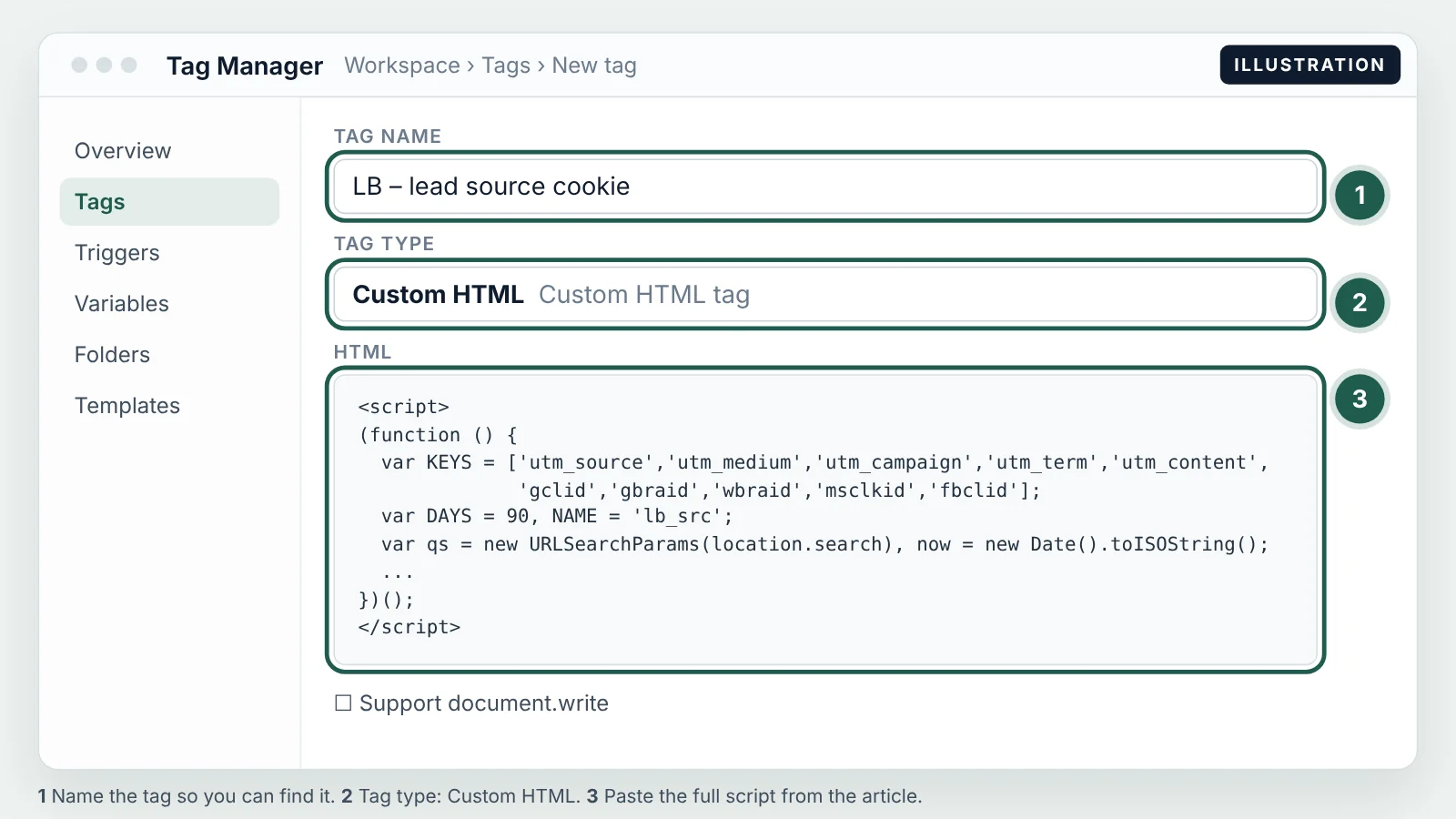
The capture has two parts: a first-party cookie that remembers where the visitor came from, and hidden fields on the form that copy the cookie into the lead. I install it with Google Tag Manager as one Custom HTML tag.
<script>
(function () {
  var KEYS = ['utm_source','utm_medium','utm_campaign','utm_term','utm_content',
              'gclid','gbraid','wbraid','msclkid','fbclid'];
  var DAYS = 90, NAME = 'lb_src';
  var qs = new URLSearchParams(location.search), now = new Date().toISOString();
  var hasNew = KEYS.some(function (k) { return qs.get(k); });

  function read() { try { return JSON.parse(decodeURIComponent(
    (document.cookie.match('(^|;)\\s*' + NAME + '=([^;]*)') || [])[2] || '{}')); } catch (e) { return {}; } }
  function write(v) { document.cookie = NAME + '=' + encodeURIComponent(JSON.stringify(v)) +
    ';path=/;max-age=' + DAYS * 86400 + ';SameSite=Lax;Secure'; }

  var data = read();
  var touch = { ts: now, landing: location.pathname, referrer: document.referrer || '(direct)' };
  KEYS.forEach(function (k) { if (qs.get(k)) touch[k] = qs.get(k); });

  if (!data.first) data.first = touch;          // first touch is never overwritten
  if (hasNew || !data.last) data.last = touch;  // last touch updates only on a tagged visit
  write(data);

  // Fill hidden fields named first_<key> / last_<key> on any form on the page
  document.addEventListener('DOMContentLoaded', function () {
    ['first','last'].forEach(function (t) {
      Object.keys(data[t] || {}).forEach(function (k) {
        document.querySelectorAll('input[name="' + t + '_' + k + '"]')
          .forEach(function (el) { el.value = data[t][k]; });
      });
    });
    var ga = (document.cookie.match(/_ga=GA\d\.\d\.(\d+\.\d+)/) || [])[1];
    document.querySelectorAll('input[name="ga_client_id"]').forEach(function (el) { el.value = ga || ''; });
  });
})();
</script>
The script is also on GitHub: github.com/MarketerLev/lead-source-capture
What each part does, in plain words:
- KEYS is the list of URL parameters worth keeping: the five UTMs and the five click IDs. Anything else in the URL is ignored.
- DAYS and NAME: the cookie is called
lb_srcand lives 90 days. Rename it if you like; keep the lifetime at least as long as your typical consult cycle. - hasNew checks whether this visit arrived with any of those parameters. A visit from a bookmark or a typed URL has none.
- read() and write() load and save the cookie. It's a first-party cookie on your own domain, so browsers treat it like any other site preference.
- touch is a snapshot of this visit: the time, the landing page, the referrer, plus any UTMs and click IDs in the URL.
- First touch is never overwritten. Once a visitor has a first touch, it stays for 90 days, however they come back.
- Last touch only updates on a tagged visit. This is the line that solves the "direct" problem. A patient who clicks an implant ad on Monday and types your URL on Friday keeps Monday's campaign as the last touch, because Friday's visit carried no new parameters.
- The DOMContentLoaded block looks for hidden inputs named
first_utm_source,last_gclid,first_landingand so on, and fills them. It also reads the GA4 client ID from the_gacookie into a field calledga_client_id.
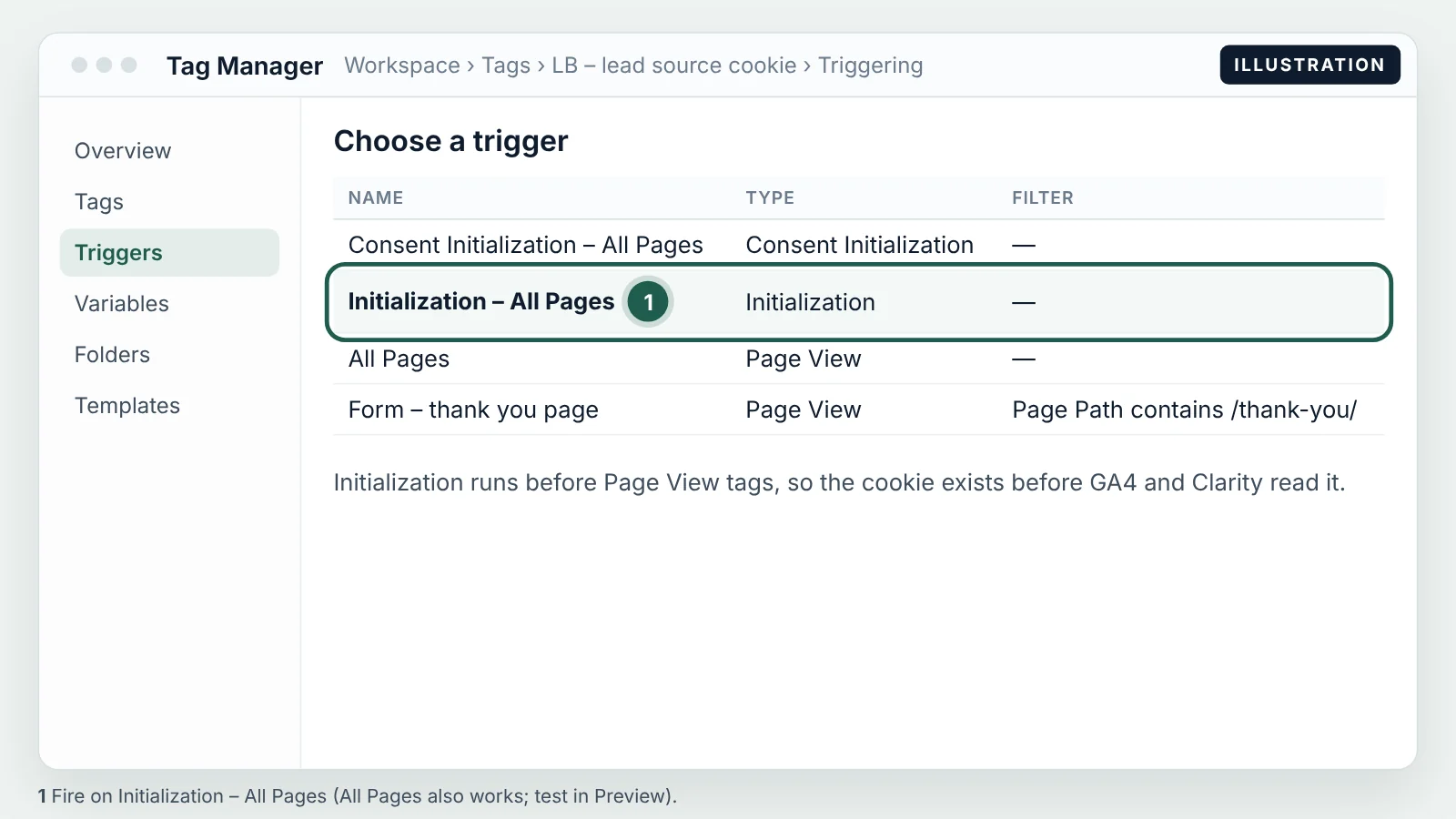
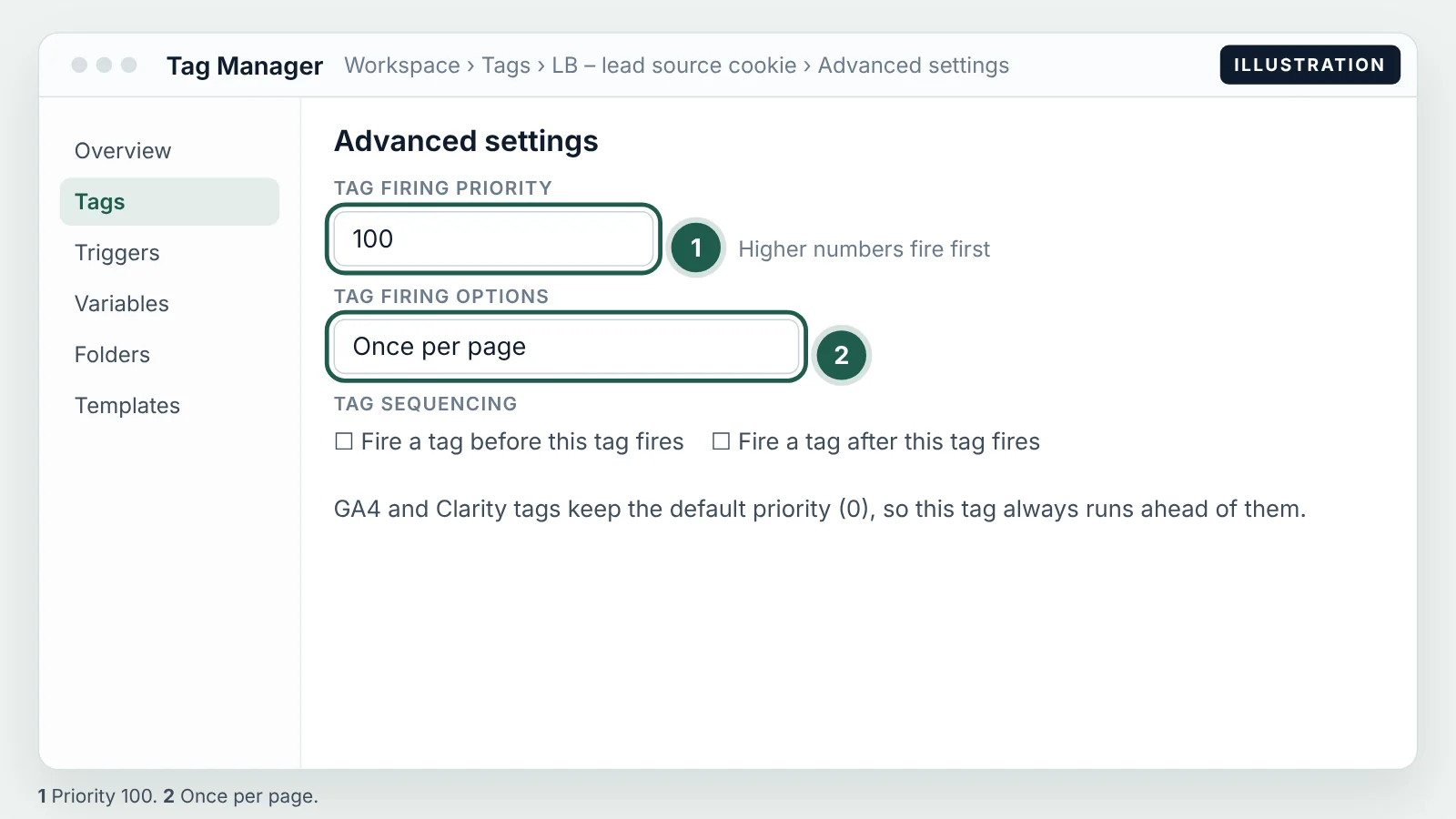
In GTM, that's three screens:
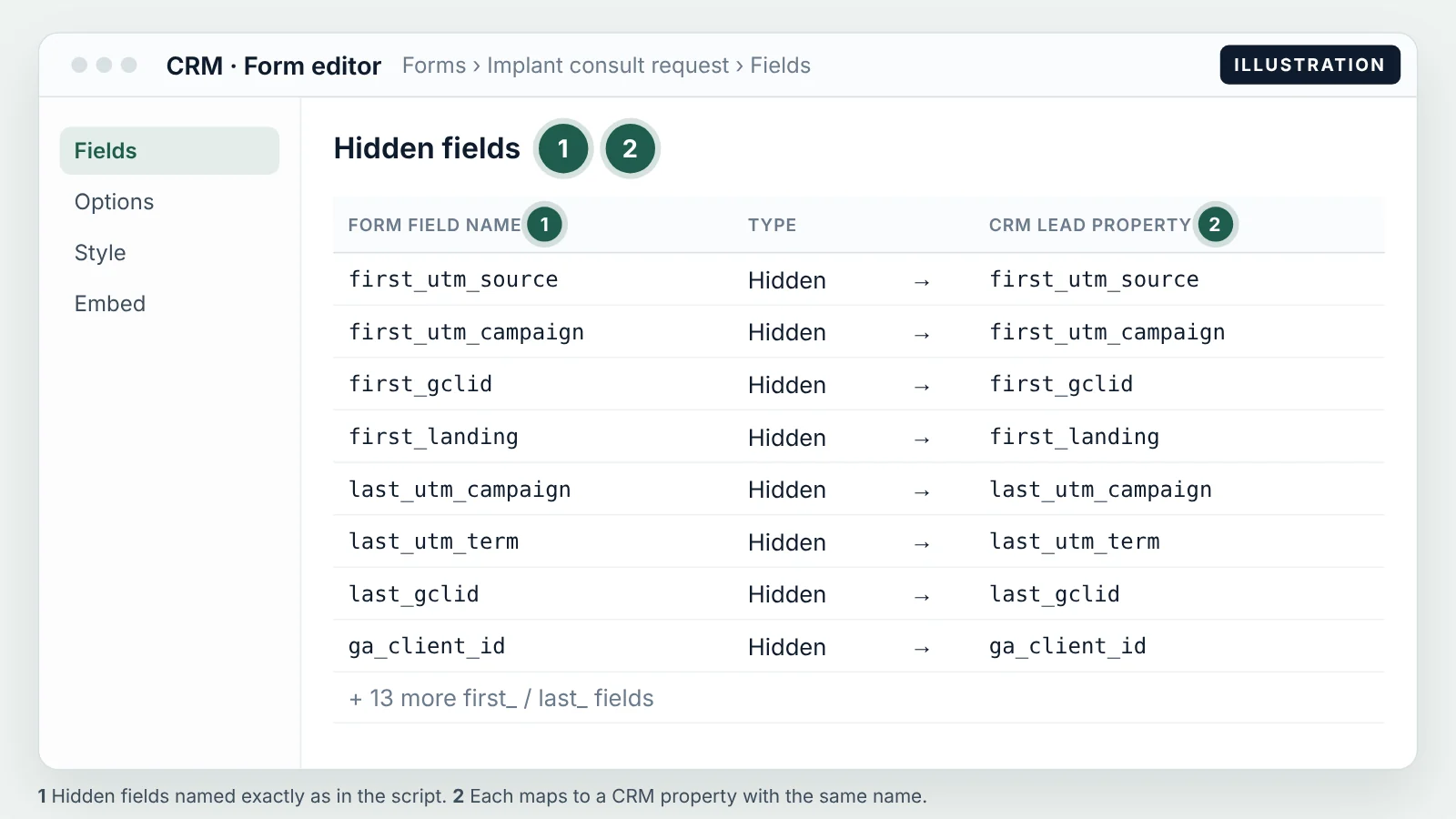
Then add the hidden fields to the form, one per value you want: first_utm_source, first_utm_medium, first_utm_campaign, first_utm_term, first_utm_content, first_gclid, first_landing, first_referrer, first_ts, the same set with last_, plus ga_client_id. Use Preview mode in GTM, open the page with ?utm_source=test&utm_campaign=check on the URL, submit a test lead and confirm the values arrive.
Map each hidden field to a CRM field of the same name. In HubSpot that's a hidden field in the form editor mapped to a contact property; in Salesforce Web-to-Lead it's a hidden input whose name is the custom field's API name. Same name on both ends saves you a mapping table nobody maintains.
Embedded forms in iframes (Calendly, Typeform, OnceHub) can't read your page's hidden fields. Pass the values as URL parameters on the embed instead. Calendly, for example, records utm_source, utm_medium, utm_campaign, utm_content and utm_term on the booking when they're on the scheduling link: https://calendly.com/your-practice/consult?utm_source=google&utm_medium=cpc&utm_campaign=implants-search-tx. Build that link from the cookie values before the widget loads.
Consent banners. If a visitor declines analytics cookies, you can still capture the UTMs into your own form, because the data goes to your CRM and nowhere else. What you don't do is fire GA4 or Clarity for that visitor. Rules differ by state and by how your banner is worded, so check with your counsel once and write the decision down.
One caveat on timing. The fill step listens for DOMContentLoaded. With the Initialization trigger, GTM almost always runs before that event. If your form is injected later by a page builder or a chat widget, test in Preview: if the hidden fields stay empty, the cookie is still there, and the form tool usually has its own "prefill from cookie" option.
Step-by-step: GA4 setup for lead source tracking
GA4 is your second opinion. It won't hold any patient data, but it records the same visit from a different angle, so you can check whether the CRM's source is believable.
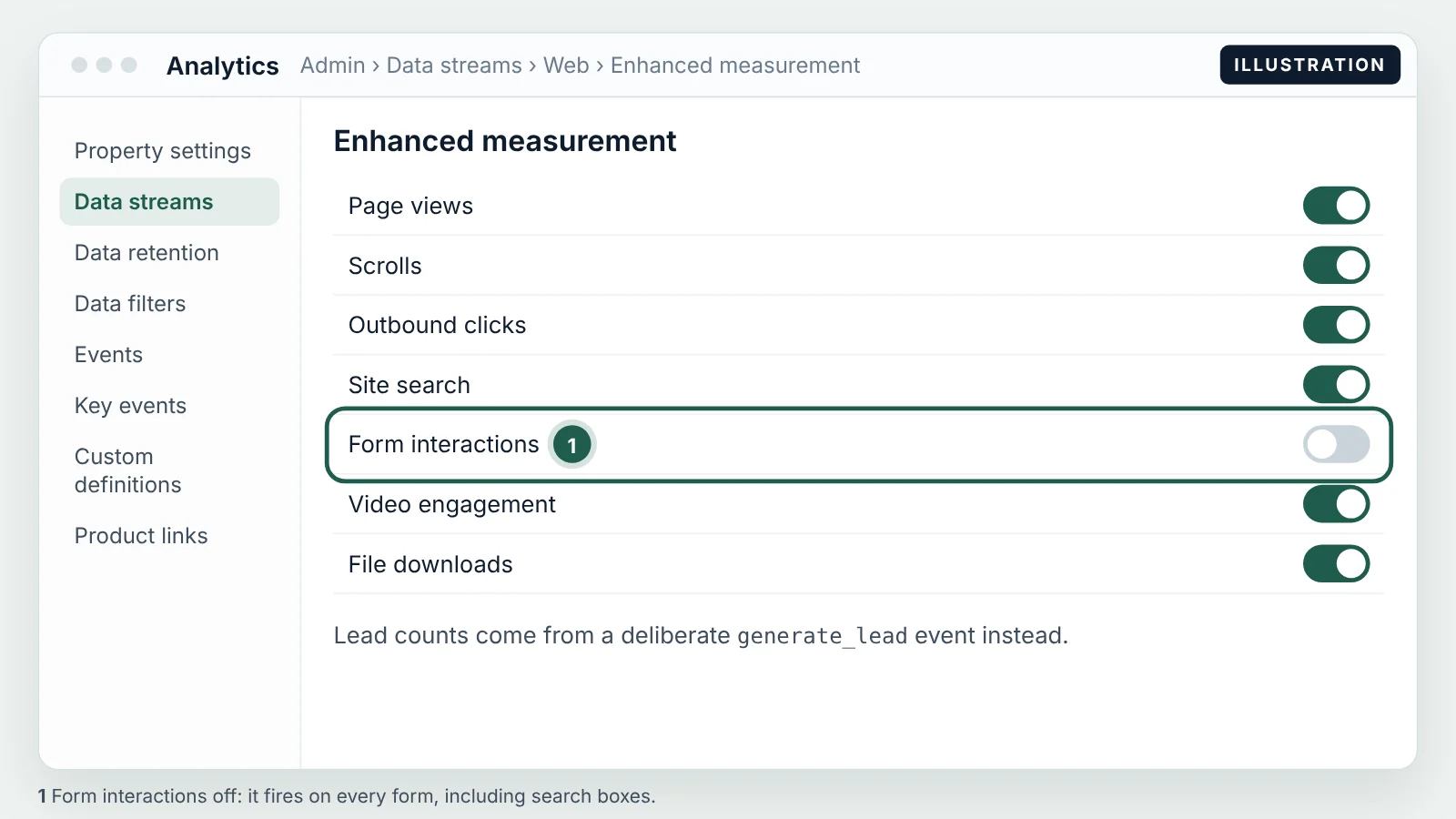
- Data stream and enhanced measurement. Admin → Data collection and modification → Data streams → your web stream → Enhanced measurement. I turn form interactions off on clinic sites. It fires
form_startandform_submiton any form, including newsletter boxes and search fields, so it inflates the count you're trying to check. You'll send a deliberategenerate_leadinstead. (Google's list of enhanced measurement events.) - generate_lead from GTM. Fire a GA4 event tag named
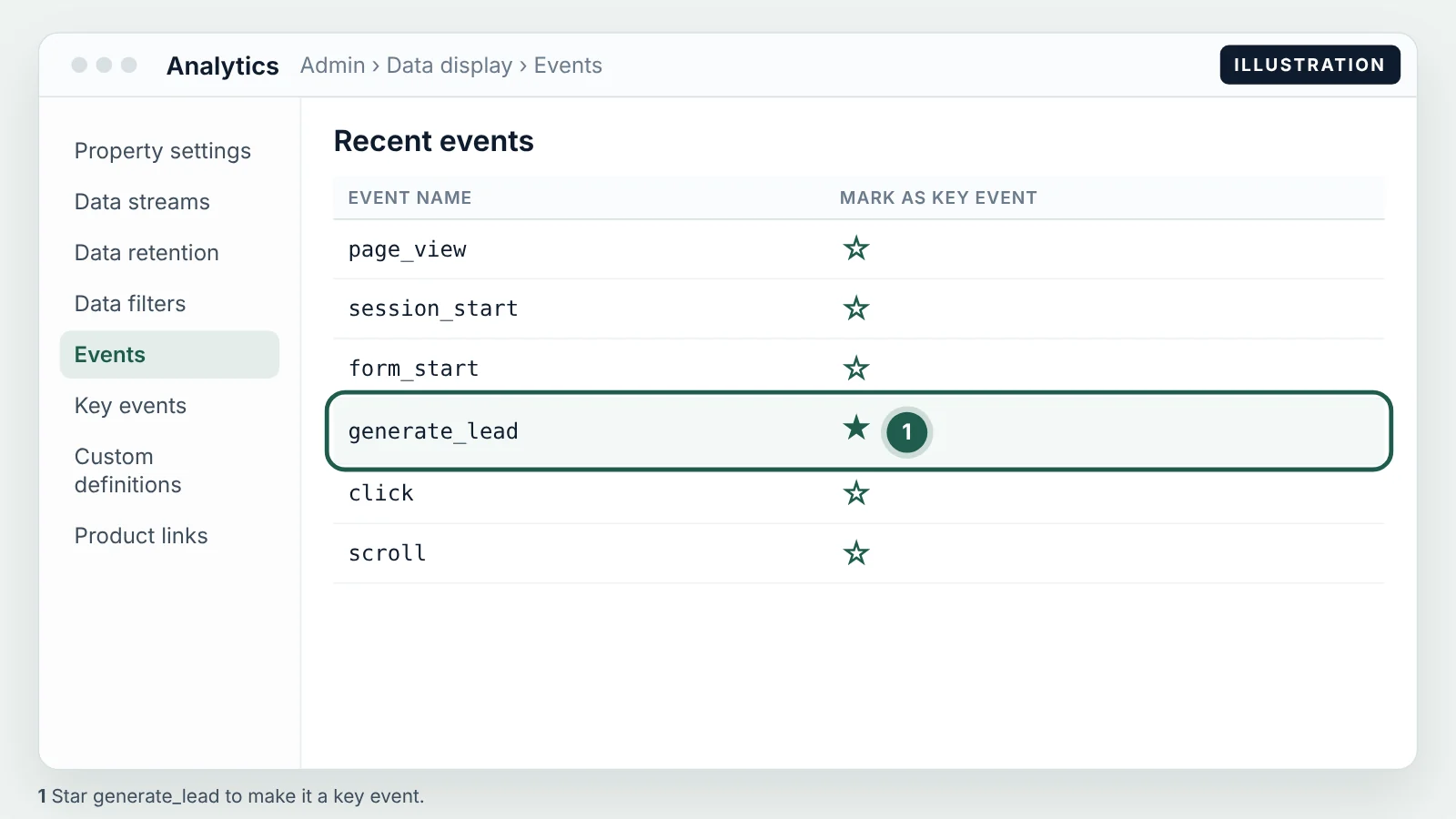
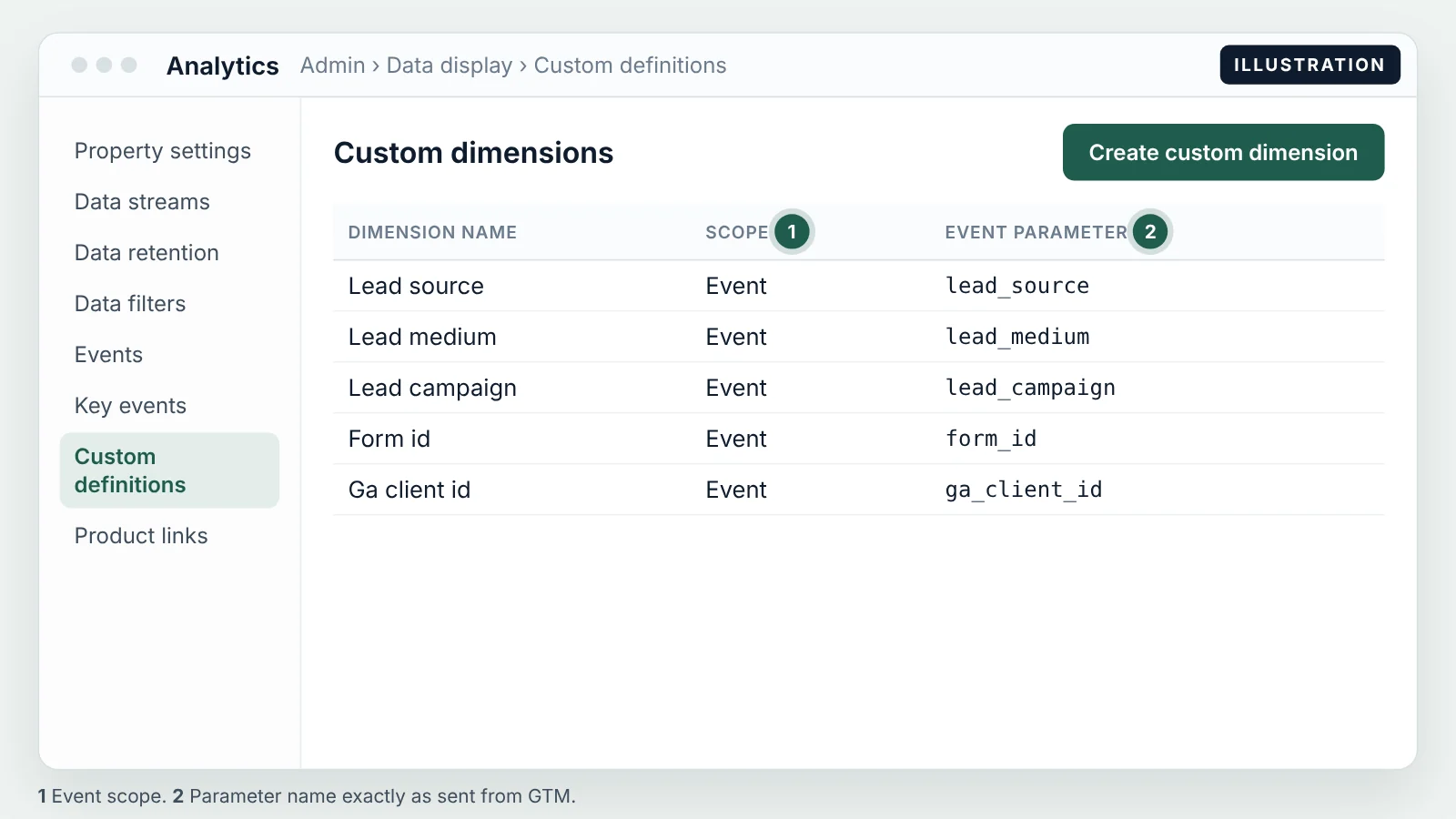
generate_leadon the thank-you page or on your form's success event, with four parameters:lead_source,lead_medium,lead_campaign(read from the cookie) andform_id. Then mark it as a key event: Admin → Data display → Events → star the event. - Custom dimensions. Admin → Data display → Custom definitions → Create custom dimension, event scope, one for each parameter, plus
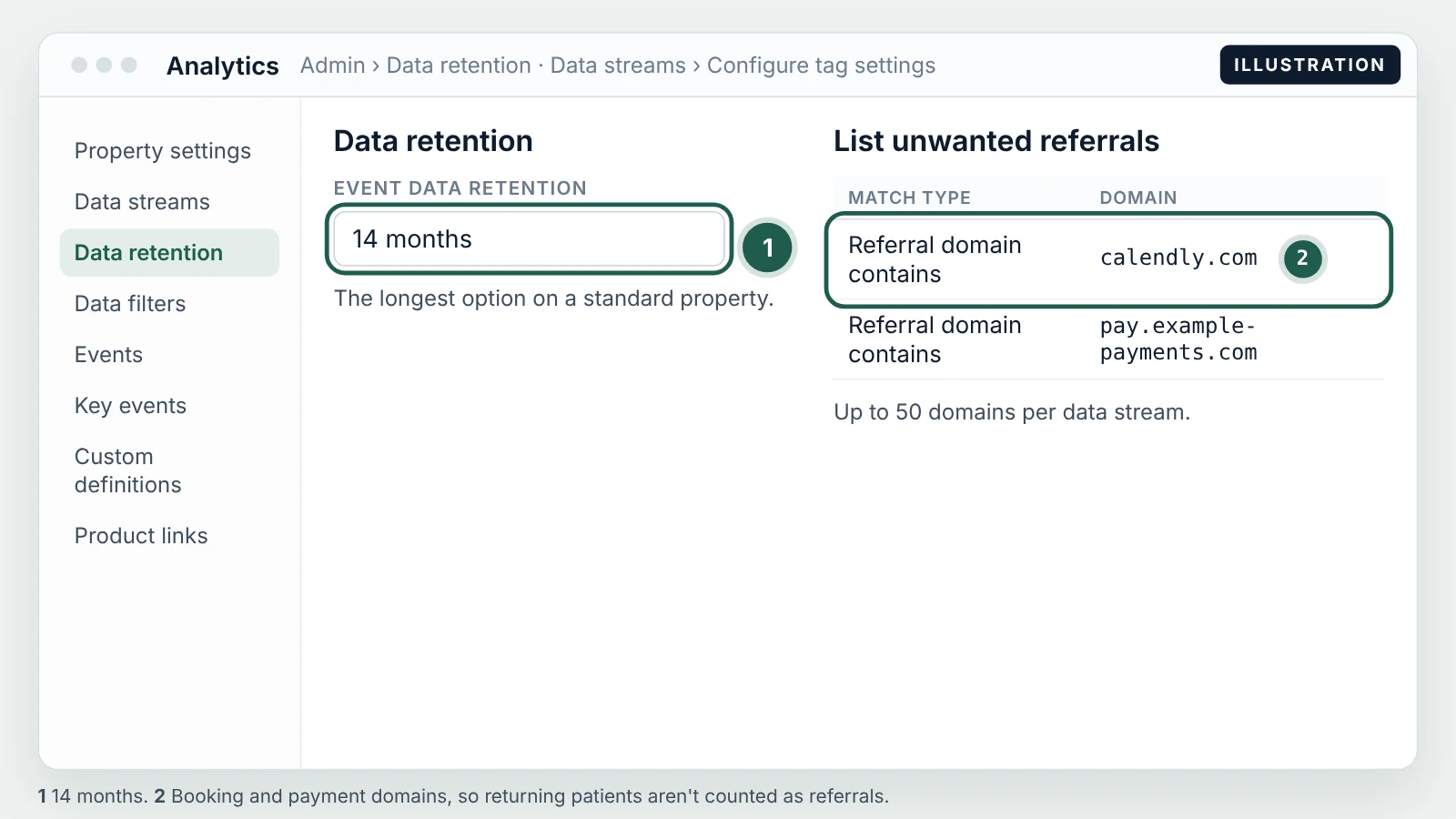
ga_client_idif you send it as an event parameter. Without this step the parameters arrive but you can't report on them. (Custom dimensions in GA4.) - Retention, internal traffic, unwanted referrals. Admin → Data collection and modification → Data retention → 14 months, the longest a standard property allows (data retention). Define your office IP as internal traffic and make sure the filter under Data filters is Active, not Testing. Under Configure tag settings → List unwanted referrals, add calendly.com and your payment provider, so a patient who books or pays doesn't come back as a "referral" from that site (unwanted referrals).
- Link Google Ads and import the key event. Admin → Product links → Google Ads links. In Google Ads, Goals → Conversions → New conversion action → Import → Google Analytics 4 → Web, and pick
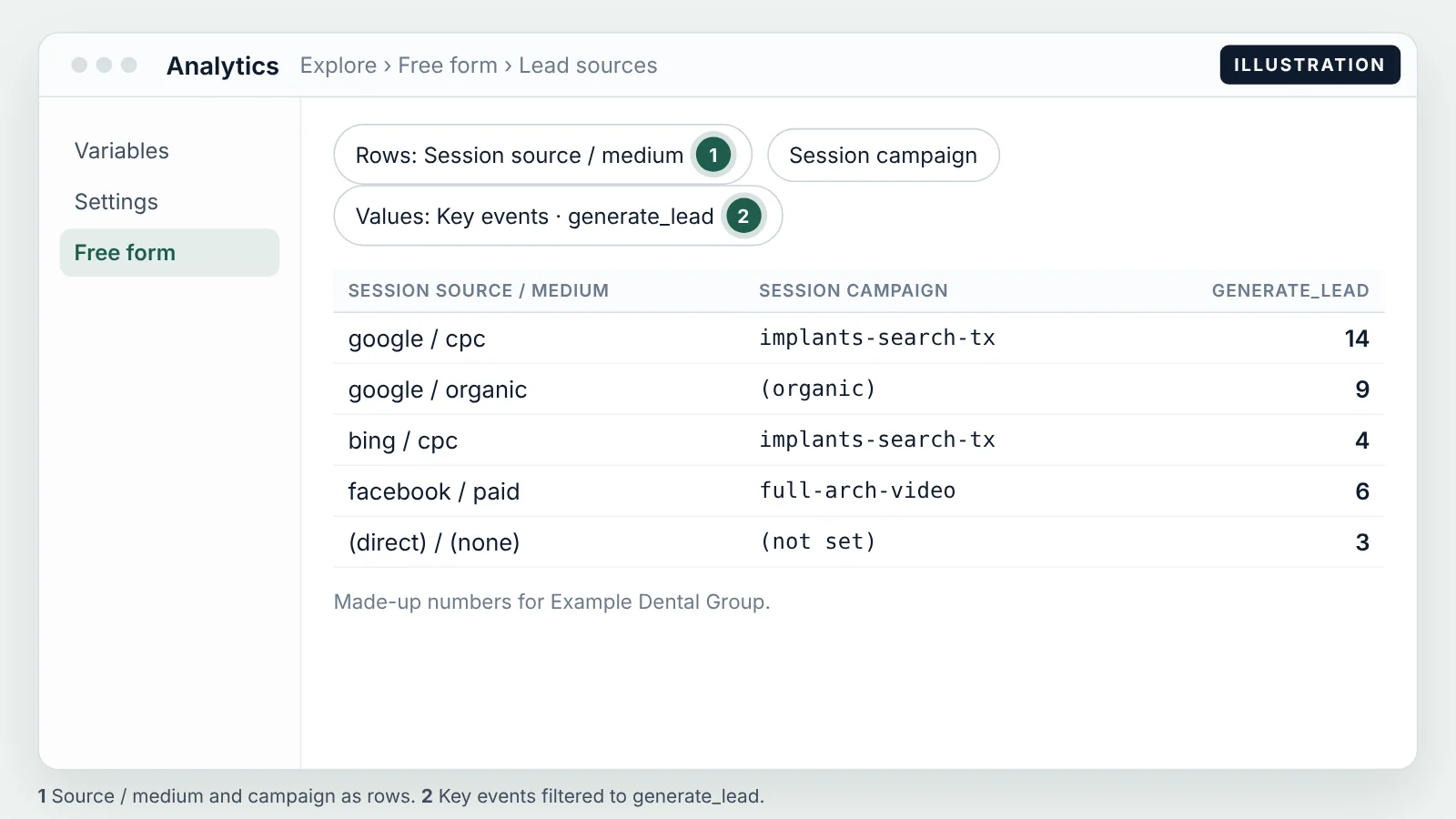
generate_lead. Use it as a secondary conversion. The primary should be a booked or qualified stage from your CRM. - Two reports. Explore → Free form with rows Session source / medium and Session campaign, the metric Key events filtered to
generate_lead. And Explore → User explorer, which lets you search a single client ID from a CRM lead and see that visitor's sessions in order.
Keep GA4 clean of anything personal. Don't send names, emails, phone numbers, dates of birth or the treatment a patient asked about, not even in a page title or URL. Google doesn't sign a BAA for GA4. If you want the detail on where the line sits, I wrote it up in whether Google Analytics can be used on a clinic site. And don't put GA4 or Clarity on a patient portal at all.
Step-by-step: Microsoft Clarity setup
Clarity records sessions and heatmaps for free. For lead source tracking it answers a question GA4 can't: what did this person actually do before they submitted?
- Create a project and install it. In Clarity, create a project for your domain, then install it through GTM with the Microsoft Clarity template from the Community Template Gallery, on the same Initialization – All Pages trigger, below the lead-source tag in priority.
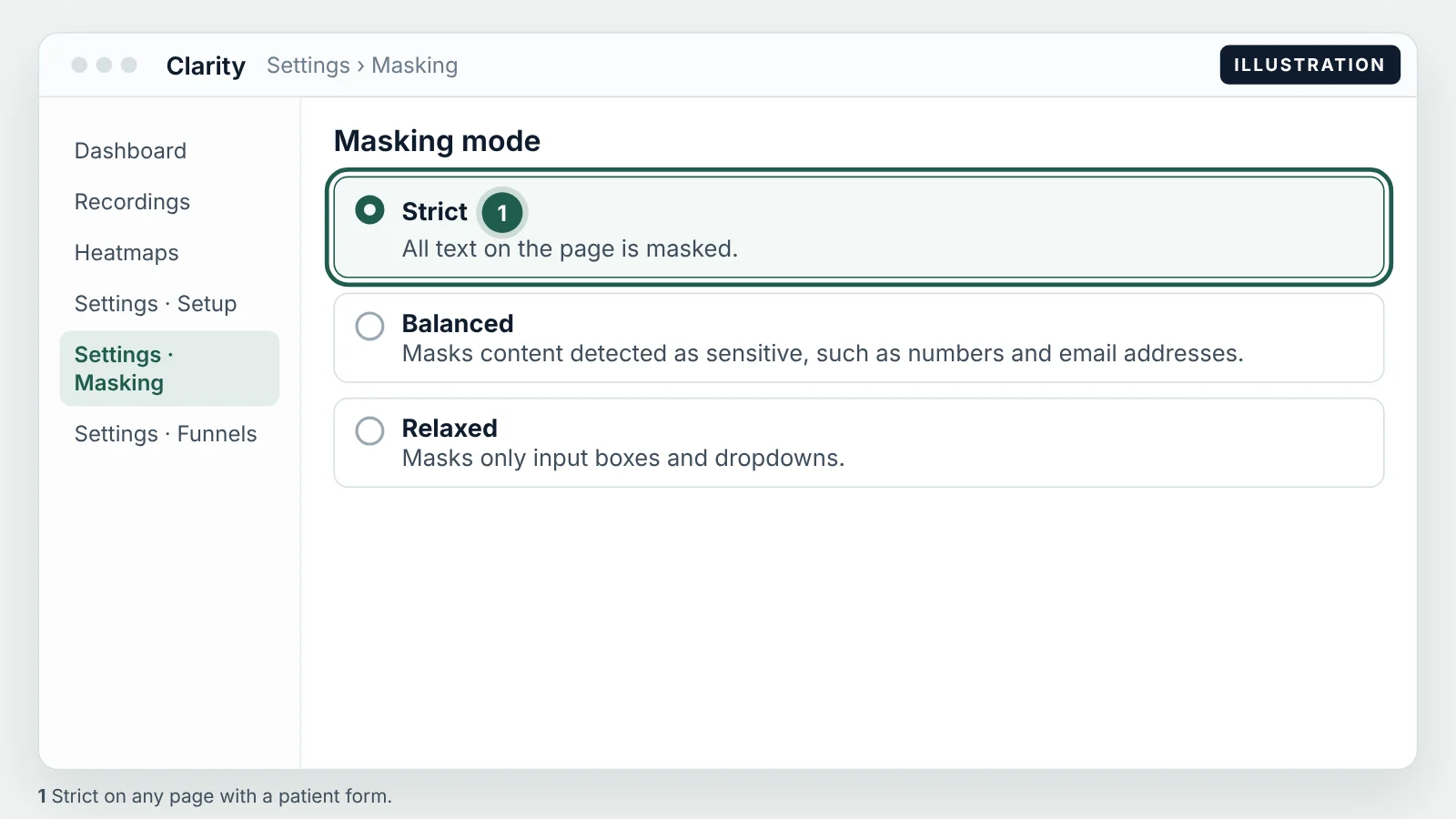
- Masking: Strict on form pages. Settings → Masking. Strict masks all text on the page; Balanced, the default, masks only what Clarity detects as sensitive. On any page with a patient form, use Strict, and add mask rules for anything else that could show a name or condition (Clarity masking).
- Connect the GA4 integration. Settings → Setup → Google Analytics integration. This lets you filter Clarity recordings by the same sources and campaigns GA4 sees, and you can then open a recording from a GA4 segment.
- Custom tags. When the form is submitted, call
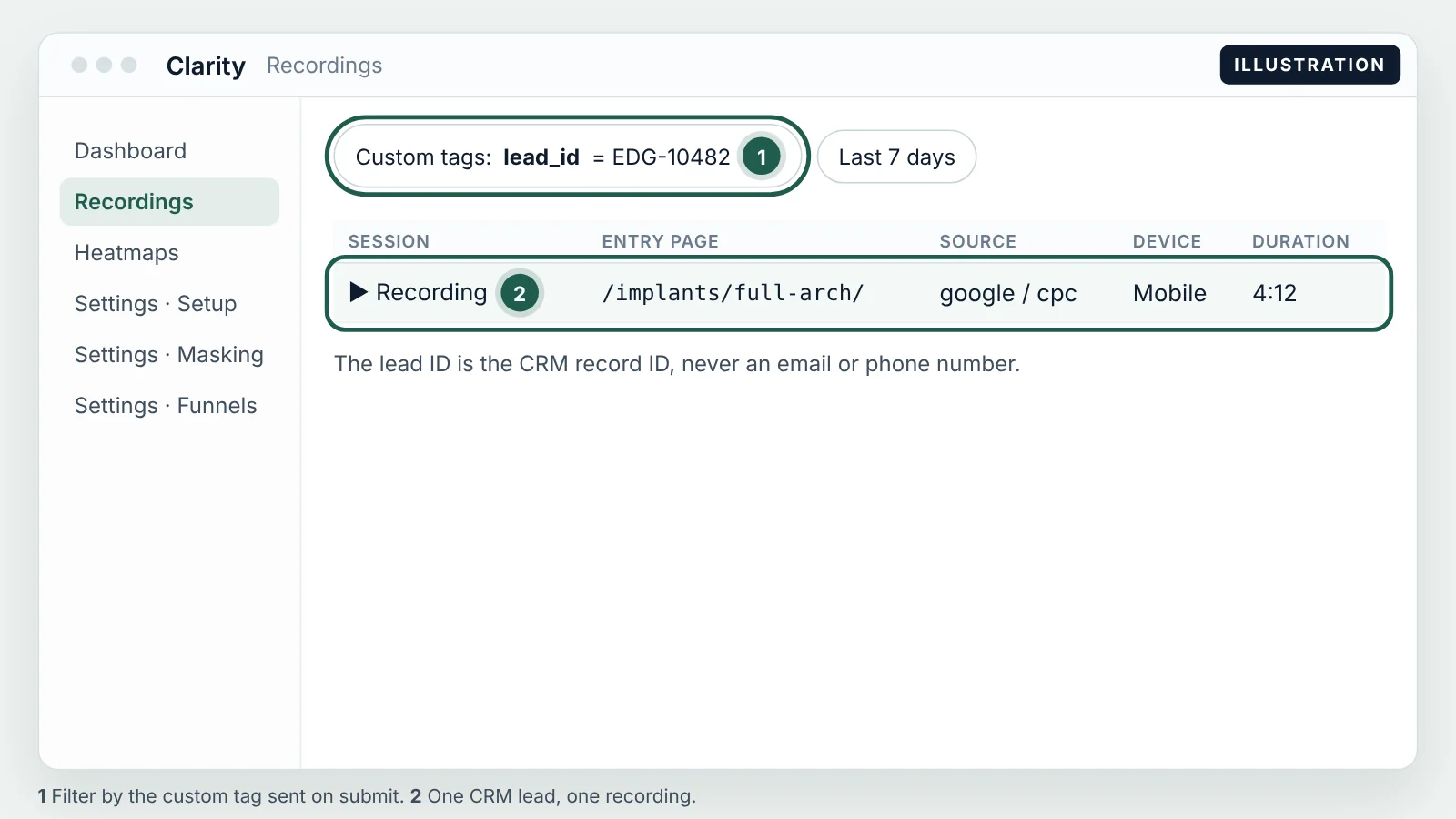
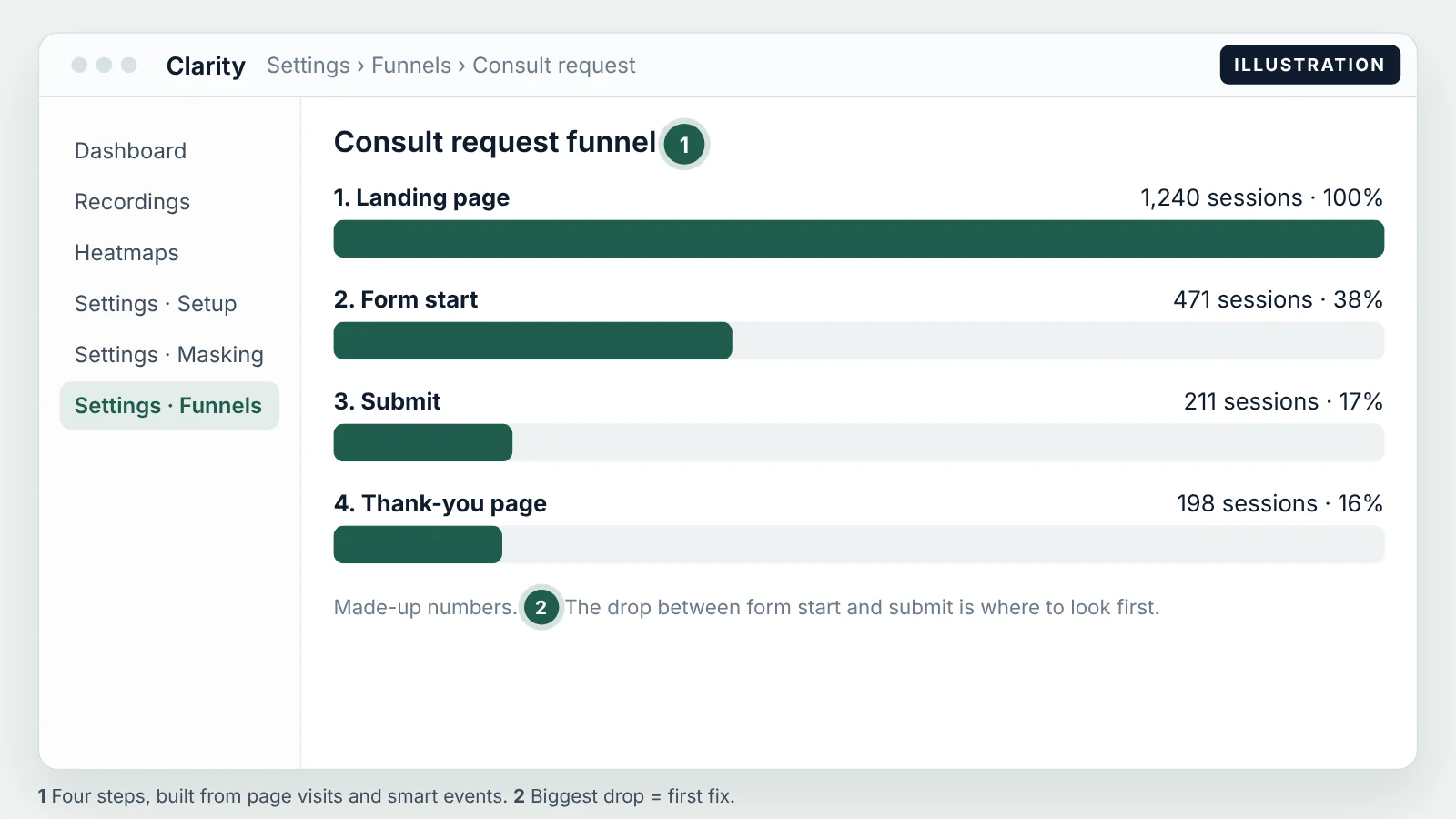
clarity("set", "lead_source", "google / cpc")andclarity("set", "lead_id", "EDG-10482"). The lead ID must be the CRM's internal record ID, never an email or phone number. A tag can't be longer than 255 characters (Clarity custom tags). Now any lead in the CRM opens its own recording with one filter. - Smart events and a funnel. Settings → Funnels → New funnel, with four steps: landing page → form start → submit → thank-you page (Clarity funnels). The drop between "form start" and "submit" is usually the cheapest conversion fix on the site.
- Saved filters. Keep a few saved segments: UTM source, referrer, device, and the custom tag
lead_id. If your project offers an intent filter, add a "high intent" segment too.
The weekly double-check
Everything above is plumbing. This is the part that makes the data trustworthy. It takes about 20 minutes, once a week, same day each week. I do it on Monday for the previous Monday to Sunday.
- Count. Pull three numbers for the same date range in the same time zone: new leads in the CRM,
generate_leadevents in GA4, and conversions in each ad platform. They won't match exactly. GA4 misses visitors who decline cookies or block scripts, and ad platforms count by click date and model some conversions. A steady gap of 10–20% is ordinary. A gap that jumps from one week to the next means something broke. The usual causes are in why Google Ads and your CRM never match. - Sample five leads. Pick five CRM leads at random, not the five newest. For each one, search its
ga_client_idin GA4 User explorer and itslead_idin Clarity. Confirm that channel, campaign, keyword, landing page and time agree across all three. Five is enough to catch a broken field; it's not a statistical sample, and it doesn't need to be. - Scan for red flags. Go down the list below. Each one has a usual cause.
- Check the calls. Phone leads need the same fields, from call tracking with dynamic number insertion: the tracking number swaps on the page based on the source, and the call record carries the campaign and click ID into the CRM. The setup is in call tracking and CRM: closing the loop. Sample one or two calls the same way you sampled forms.
- Log it. One row per week in a shared sheet. After a month you'll see whether gaps are stable, and after a quarter the sheet is the evidence for any budget decision.
| Red flag | What it usually means | First check |
|---|---|---|
| (not set) in source or campaign | Hidden fields not on this form, or the form loads in an iframe | Submit a test lead from that page in GTM Preview |
| Sudden spike in direct | A redirect or booking widget is stripping parameters | Click your own ad and watch the URL land |
| Duplicate leads within minutes | Double submit, or the form and a chat widget both create the lead | Compare timestamps and form_id |
| Same IP, many leads | Bot or competitor submissions | Clarity recordings for those leads; add a honeypot field |
| Leads at 3 a.m. clinic time | Bots, or a time-zone conversion error | Check whether the timestamp ends in Z (UTC) |
| Click ID present but source = organic | UTMs missing on the ad while auto-tagging is on | Ad tracking template and final URL suffix |
| Source = Google but no gclid | Organic or Maps traffic mislabeled, or auto-tagging off | Google Ads → Admin → Account settings → Auto-tagging |
The weekly log needs these columns: week starting, reporting time zone, CRM leads, GA4 generate_lead, Google Ads conversions, Meta leads, Microsoft Ads conversions, gap CRM vs GA4 (%), leads with (not set) source, leads sampled, sample mismatches, red flags found, fix and owner, fixed by (date).
The one-page version of this routine, with the five steps, the red flags and the log columns, is here: weekly lead-source check (PDF). Print it and keep it by the screen for the first month.
What this tells you once it's running
After two or three clean weeks you can finally answer the question the agency report never did: which keywords and campaigns produce leads, at what cost. That's the start, not the point. A keyword that produces cheap leads who never book is the most expensive keyword in the account.
The point is cost per booked patient by keyword. You get there by adding one more field, the CRM stage (consult booked, consult attended, treatment accepted), and grouping by source. The difference between the two numbers is the whole argument of cost per patient vs cost per lead.
Then you close the loop. Because each lead carries its click ID, you can send booked and accepted patients back to Google, Meta and Microsoft, so their bidding learns from patients instead of form fills. That's offline conversion tracking, and lead source tracking is the foundation it stands on. When I inherited a wasteful account at a luxury US healthcare clinic, this order of work, sources first, then the patient stages, then the import, is what cut cost per verified patient by about 78% while spend scaled about 2×.
If your forms collect anything beyond name and contact details, check the form tool itself as well. HIPAA-compliant forms covers which builders sign a BAA and how to keep the click ID when you switch.
If you'd rather have someone set this up and run the weekly check: the paid audit is $500, one channel, one location, credited toward setup. I trace your leads from the click to the CRM and give you the fix list in priority order. The full setup of conversion tracking and CRM-verified attribution is what comes after.
15 minutes. With me, not a sales rep.
Diagnosis before treatment.
Frequently asked questions
Do I need a new CRM for lead source tracking?
No. Any CRM that accepts custom fields from a web form works, including HubSpot, Salesforce, Zoho and GoHighLevel. What matters is that the 12 fields exist on the lead record and that your form writes to them. Replacing a CRM to get source data is almost never the cheapest fix.
Does this work with HubSpot and Salesforce?
Yes. In HubSpot, add hidden fields to the form and map each one to a contact property with the same name. HubSpot's own original-source property is useful, but it doesn't store the keyword or the click ID, so keep both. In Salesforce, create custom fields on the Lead and map them to the Opportunity on conversion.
Is GA4 HIPAA compliant for this?
Google doesn't sign a business associate agreement for GA4, so it can't receive protected health information. This setup sends GA4 only sources, campaign names and a client ID, never names, contact details or treatment information, and it keeps GA4 off patient portals. Where exactly the line sits is covered in the article on Google Analytics and HIPAA.
What if most of our leads come by phone?
Use call tracking with dynamic number insertion. The number on the page changes by source, and the call record carries the campaign, keyword and click ID into the CRM, the same fields a form would. Then include one or two calls in the weekly sample.
How long until the data is trustworthy?
Capture works from the day you install it, but give it two to four weekly checks before you move budget on it. That's how long it usually takes to find the forms, redirects and widgets that drop parameters. History from before the install can't be rebuilt.
Sources and official documentation
Every technical claim above can be checked against the platform's own documentation.
- URL builders: Collect campaign data with custom URLs (Analytics Help)How UTM parameters tell Google Analytics which campaign and source brought a visitor.
- About auto-tagging (Google Ads Help)Auto-tagging adds the GCLID to your ad URLs, and it is on by default in new accounts.